
Smart Retail POS: Self-Checkout, AI Checkout and Loss Prevention
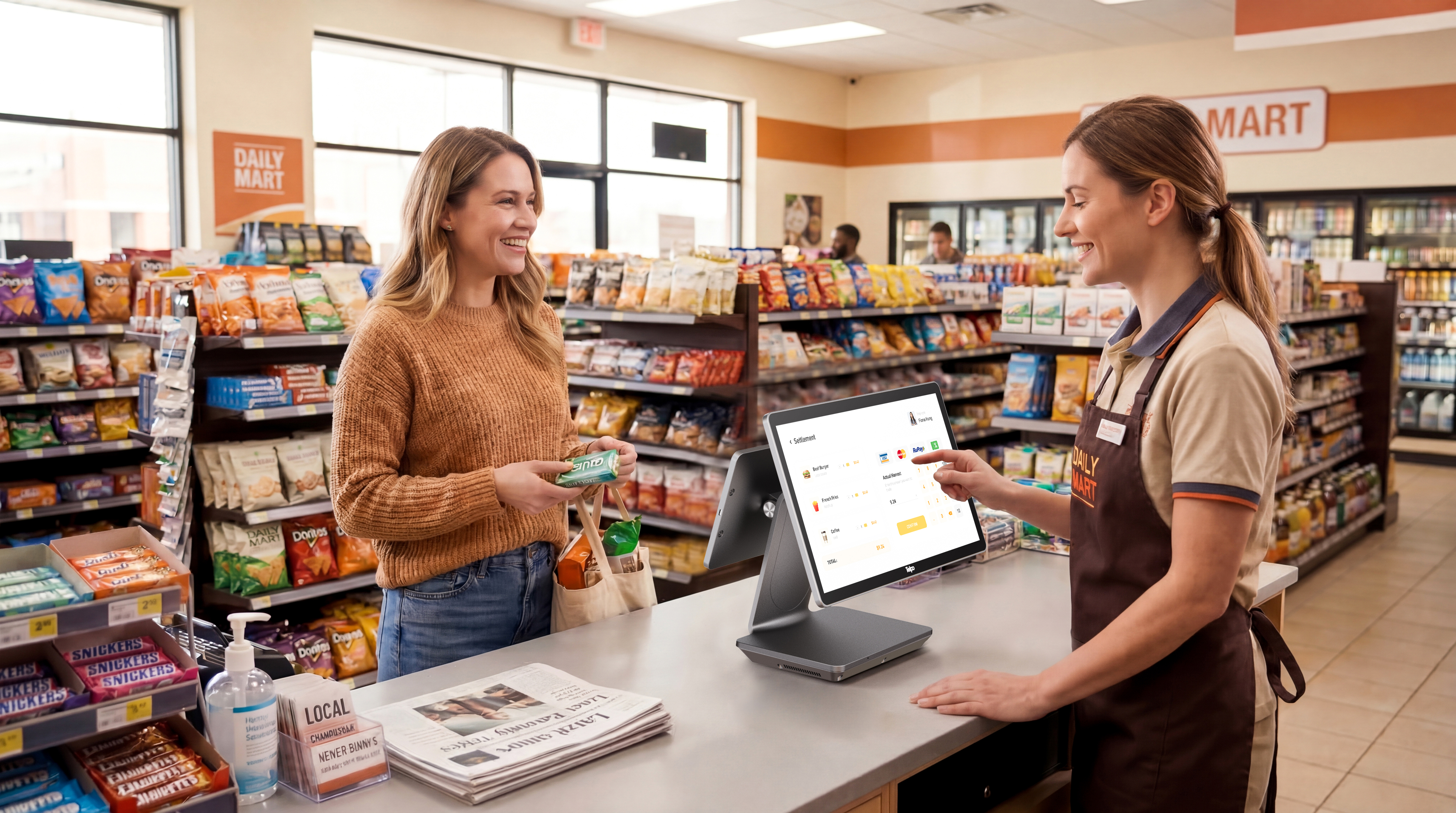
Smart retail checkout is not one product decision. It is three: who serves the customer, how the item is identified, and who is accountable for the transaction. A self-checkout kiosk answers the first question by handing the scan to the shopper. An AI checkout POS answers the second by recognising the item on the device. A biometric POS machine — a terminal where a fingerprint or a face template authorises the operator, the member, or the payer — answers the third.
Telpo Technology Co., Ltd. is a manufacturer of AI-driven smart terminals founded in 1999 and headquartered in Foshan, China, with a portfolio spanning POS terminals, payment terminals, self-service kiosks, ticket validators, biometric devices and edge AI hardware. The company operates four overseas business segments — Smart Retail, Smart Payment, Smart Transportation and Biometric Security — and reports customers in more than 100 countries. Its Smart Retail line, which includes the self-service kiosk family, the AI checkout POS C50, the C9 dual-screen cash register series and the TPS900 Smart Payment Terminal, is a useful reference point for the form-factor mapping below because the same manufacturer covers all three checkout roles.
Why checkout hardware became a constraint problem
Three pressures pushed smart retail terminals away from a single countertop model.
Labour allocation. A manned lane consumes a person for every transaction. A self-checkout lane consumes a person for several lanes plus an attendant for exceptions. The trade-off is not automatic — it depends on basket mix, store format and how much of the basket is barcoded.
Shrink and attribution. Retail loss rarely comes from one clean failure. It accumulates through unscanned items, mis-selected produce categories, uncontrolled refunds, and shared operator credentials that make transaction history unattributable after the fact. Hardware can close some of these gaps — through weight verification, item recognition, and identity-bound login — but only where the terminal was specified for it.
Fiscal and network constraints. In markets with tax-control regimes, the checkout device itself is regulated. Germany's KassenSichV requires a certified technical security system (TSS) for cash registers, per fiskaly's 2026 country-by-country review. At the same time, cloud-dependent recognition becomes a liability when a store's uplink drops during a peak hour. Both constraints push capability onto the terminal.
Mapping POS terminal form factors to smart retail scenarios
The practical question for a retail buyer is not "which POS terminal is best" but "which terminal shape matches this lane's job". The table below maps the role to the form factor and to the specifications that actually decide fit.
| Checkout role | Matching form factor | Specifications that decide fit | Reference models |
|---|---|---|---|
| Shopper-operated checkout, barcoded basket | Freestanding or wall-mounted kiosk | 21.5" FHD touch, 80 mm printer to 220 mm/s, EFTPOS integration, 0.2 s scan module | K8M, K8, K10 |
| Self-ordering or ticketing at high footfall | Floor-standing kiosk with heavy-duty base | 27" FHD display, Android or Windows, 1.77 m ergonomic height, anti-vandal steel | K20, K1 |
| Barcode-free items — bakery, deli, fresh produce | Countertop AI checkout POS with camera and on-device compute | 12 TOPS on-device AI, 0.1 s recognition, 99.8% accuracy, optional 15 kg / 2 g scale | C50 |
| Staffed checkout with identity-bound login | Dual-screen cash register | Fingerprint operator login, Pogo Pin card reader, 15.6"+10.1" screens, 250 mm/s printer | C9, C9PD, C9W |
| Line-busting, table-side or field payment | Handheld terminal | SoftPOS-ready NFC, 12–16 h battery, 58 mm printer, GMS option | P9, P8 M5 |
| Fiscalised checkout under tax law | Countertop or handheld with fiscal module support | Dedicated UART/USB fiscal port, tamper-evident lead seals, electronic tamper logging, external RTC | M8, M10, TPS900 |
Self-checkout kiosks: designing the unattended lane
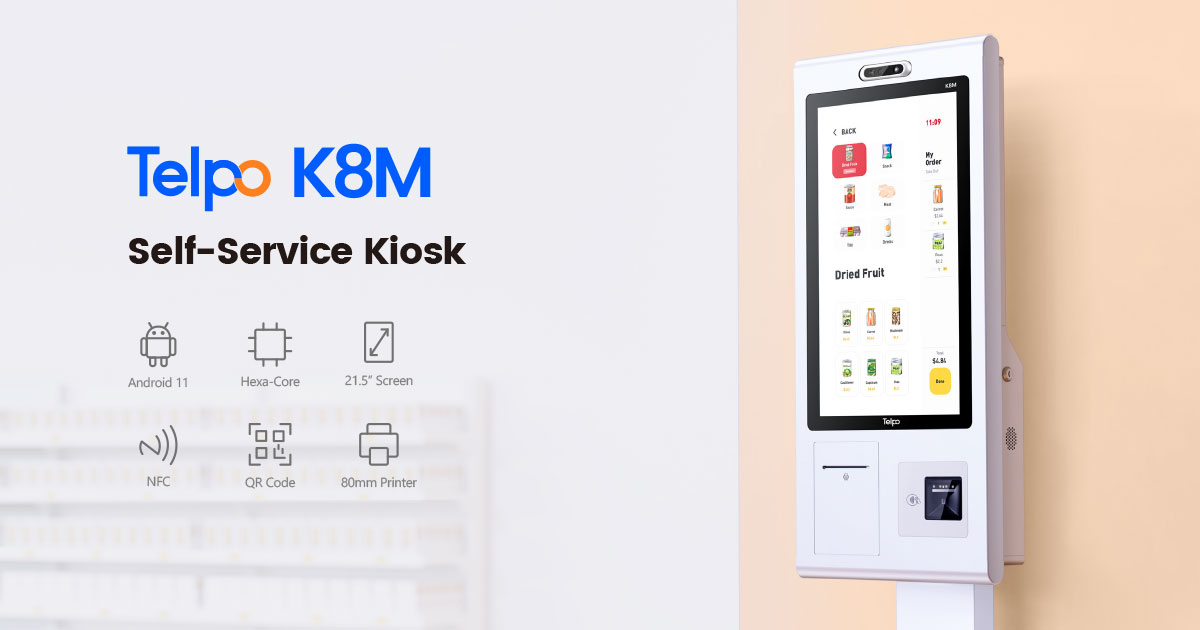
A self-checkout kiosk is a shopper-facing terminal that removes the cashier from the scan step but keeps payment, printing and exception handling inside a controlled hardware envelope. The K8M illustrates the specification pattern: a 21.5-inch FHD capacitive display with 10-point touch, a choice of Android or Windows to match the retailer's software ecosystem, an integrated 80 mm thermal printer running at up to 220 mm/s with auto-cutter, and an optional branded barcode scanner capable of reading at speeds as fast as 0.2 seconds with omni-directional coverage.
Payment handling is where kiosk specifications diverge most. The K8M accepts NFC, smart cards, magnetic stripe cards and Pin-on-Glass, and it is designed to integrate with external EFTPOS devices — including Telpo POS terminals and third-party payment devices — so card transactions can be processed on certified payment hardware rather than inside the kiosk itself. Enclosure material matters for high-traffic stores: the K8M uses commercial-grade cold-rolled steel or stainless steel, and supports wall-mount, countertop, floor-standing and checkout-counter installation.
Two smaller-format alternatives serve different footprints. The K10 uses a 15.6-inch FHD display, weighs 4.29 kg, runs Android 14 on an octa-core 2.2 GHz processor, and adds a 30° ergonomic tilted stand — the lightweight design reduces logistics and shipping cost when a chain rolls out across many sites. The K8 uses the same Android 14 platform with a 21.5-inch 1080×1920 portrait display and a 150 mm/s printer, and can double as a digital advertising display when idle. For QSR and cinema environments, the K20 scales up to a 27-inch FHD touchscreen with a heavy-duty steel base and a 1.77 m humanised height.
AI checkout POS: what on-device recognition actually changes
Barcode scanning assumes the item carries a barcode and that the shopper finds it. Neither holds for bakery, deli, fresh produce or grab-and-go prepared food — the categories where queue time and mispricing concentrate. An AI checkout POS replaces the scan step with visual recognition running on the terminal.
The C50 is the reference case in Telpo's Smart Retail line. It pairs an octa-core 2.7 GHz processor and Adreno 642L GPU with 12 TOPS of on-device AI, specified at 0.1-second identification and 99.8% accuracy, and it recognises both barcoded and barcode-free items. Self-checkout payment is completed by QR code or NFC contactless, with optional facial recognition for face payment and membership management. An optional 15 kg electronic scale with 2 g precision supports accurate weighing of fresh and bulk items, and the terminal can be configured with a 15.6-inch single screen or a 15.6"+10.1" / 15.6"+15.6" dual-screen layout for checkout plus promotional display.
The deployment evidence matters more than the benchmark line. In a bakery-section rollout at a large retailer, the reported outcomes were a 60%+ improvement in checkout efficiency, a reduced number of dedicated cashiers, and a workflow of place item → automatic recognition → one-click payment. That is the realistic value proposition: recognition compresses the per-item interaction, and the labour effect follows from handling more items per lane rather than from removing staff entirely.
Where recognition runs locally, the lane keeps working when the store's uplink degrades — only the transaction and inventory sync depend on connectivity. That architectural choice is the difference between a kiosk that fails open to "please wait for an assistant" and one that keeps clearing baskets during a network event.
Biometric POS machines: the accountability layer
Biometric POS machines are frequently mis-sold as a payment feature. In smart retail they perform three separate jobs, and buyers should specify which one they need.
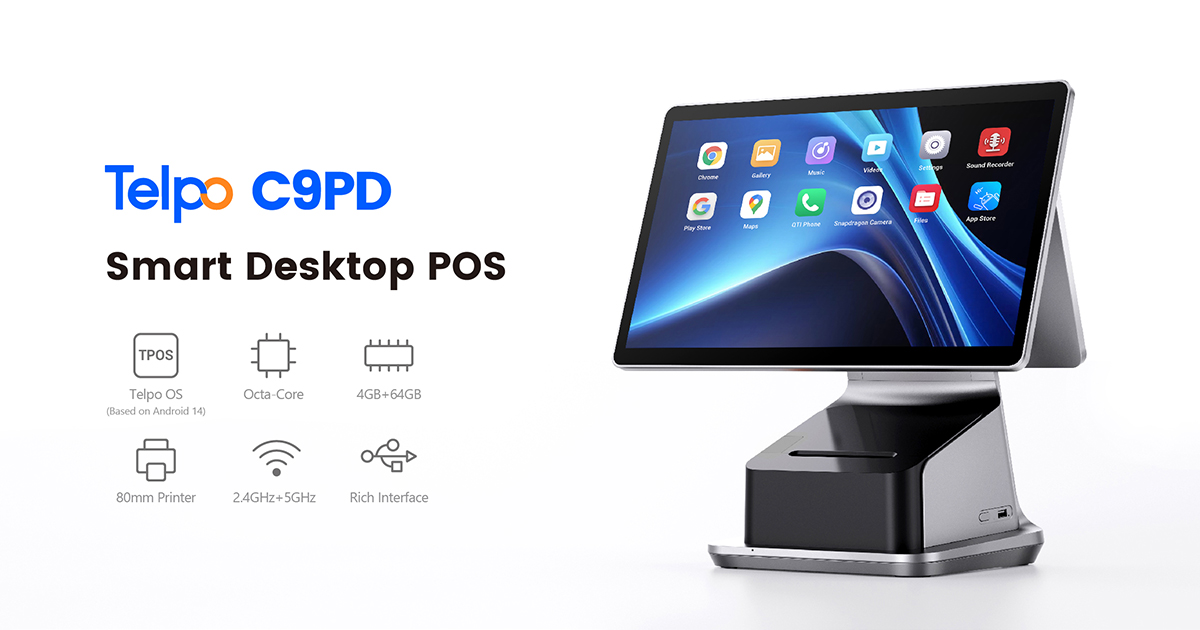
Operator authentication. On the C9, C9PD, C9W and C9 VESA models, fingerprint authentication is used for device wake and employee login. The operational effect is attribution: a checkout session belongs to an enrolled employee rather than to an open terminal, which is the precondition for investigating refunds, voids and no-sale drawer events. It also removes the shared-credential habit that makes exception reporting meaningless.
Customer and member identification. On self-service hardware, facial recognition is listed as an optional camera module rather than a standard feature. The K10 uses a dual-lens RGB+IR camera for biometric identity verification; the K8, K8M and K1 list facial recognition as optional. The dual-lens configuration matters because infrared imaging is what separates a live check from a plain photograph match.
Identity verification at the point of transaction. The TPS900 Smart Payment Terminal offers an optional FBI-certified fingerprint scanner for biometric payment verification and KYC scenarios, alongside magnetic stripe, chip, QR and NFC acceptance. The P9 Financial version offers a fingerprint variant positioned for KYC compliance. These are fraud-control and onboarding features, not checkout-speed features, and they belong to different procurement criteria than a self-checkout kiosk.
Specifying biometrics correctly therefore means answering a narrow question: is the identity check protecting the transaction (operator), the relationship (member), or the counterparty (KYC)? A terminal bought for the wrong role will carry cost without delivering the control.
How the three layers combine for loss prevention
Loss prevention in a modern store is an architecture, not a device. It works when three layers reinforce each other.
Layer one — people. Fingerprint login on the C9 series binds the session to an enrolled employee. The terminal also supports Pogo Pin modular card reader expansion, so payment acceptance can be added or changed without replacing the register.
Layer two — items. AI recognition reduces mis-selection at the point of scan, and the optional 2 g-precision scale on the C50 allows weight to be checked against the recognised item for fresh and bulk goods. Real-time inventory deduction keeps the item file consistent with what was actually sold.
Layer three — records. Fiscalised markets require the terminal itself to protect the audit trail. The M8 and M10 are built for this: dedicated UART/USB ports for a fiscal module, physical tamper-evident lead-sealed screws, electronic tamper detection that logs and tracks device modifications, an external RTC circuit for accurate timekeeping, and a backup battery for power-loss operation. The TPS900 provides the same fiscal module integration in a handheld form for field collection.
Deployed together, the layers produce an auditable chain: an identified operator, a recognised item, a verified weight where relevant, and a tamper-evident transaction record. Deployed alone, each layer closes only part of the gap.
Comparison with traditional manned checkout
A manned lane is still the most flexible checkout format. It handles damaged barcodes, loose produce, age-restricted sales, split payments and complaint resolution without a design compromise, and it requires no per-item recognition library. For a small store with a predictable basket, a countertop cash register such as the C9PD — with Android 14, up to 8 GB RAM and 128 GB storage, a 15.6-inch 350-nit display and a built-in 80 mm Seiko printer at 250 mm/s — remains the lower-risk investment.
Self-checkout changes the economics but not for free. In a large-format supermarket deployment, the reported results from K10 units were labour redeployment rather than labour elimination, throughput comparable to traditional manned checkouts but at a significantly lower per-transaction cost, and a smaller footprint that released floor space. Those outcomes depend on the store running an attendant for exceptions and on the basket being largely barcoded.
The honest limitation is this: self-checkout shifts shrink risk from the cashier to the lane, and AI recognition does not eliminate that risk on its own. Recognition accuracy is quoted against a defined item library; every new SKU, packaging change or seasonal line requires enrolment before the terminal can identify it. Stores that cannot maintain that library will get better results from barcode-only kiosks and a weight check than from a vision system kept permanently out of date.
Market signals for 2026 planning
Android is now the default operating layer. Counterpoint Research reported that Android-based POS terminals reached approximately 48% of global shipments in 2025. That shift matters for buyers because it moves the integration question from "does the hardware support our software" to "is the terminal GMS-certified and updatable". Telpo's M10, for example, is GMS-certified, and the P9 non-financial version is GMS-certified under certification number P9_arm64.
Market value is growing, but the definition varies by source. Fortune Business Insights valued the global point-of-sale market at USD 38.57 billion in 2025, covering hardware, software and services. Buyers should note that published POS market figures frequently differ by an order of magnitude because some analysts include transaction processing revenue while others count hardware and software only.
Fiscalisation is now a hardware requirement, not a software add-on. Germany's KassenSichV mandates a certified technical security system for cash registers. For terminals sold into such markets, the fiscal module port, the tamper-evident seals and the electronic tamper log are procurement criteria, not optional extras.
Payment certification depth is a supplier filter. The TPS900 carries PCI PTS POI V6.x certification (4-90168), EMVCo Contact Level 2 (2-05543-1-1C-ICTK-0125-4.4b and related numbers), EMVCo Contactless Level 1 (19629 1125 320 32a 32a FIMC), Visa Paywave (CDTEPC02876A), Mastercard Paypass (TLOA-TELP250101-250121(a)) and Mastercard TQM (TQM5183/01 and TQM5183/02). The P9 holds EMV Contact L2 (2-05601-1-1C-BCTS-0625-4.4c), UnionPay QuickPass (QP-1203) and PCI PTS POI 6.X (4-40460 for the PDA financial variant). A retailer deploying self-checkout should confirm that the payment path attached to the kiosk carries this depth, because the kiosk itself is usually outside the payment certification boundary.
Limits and boundary conditions
Several constraints should be settled before a purchase order, not after.
- Biometric data is regulated separately from payment data. Fingerprint and face templates are sensitive personal data in most jurisdictions. Local privacy review, consent flow and retention rules must be completed before enrolment begins, and the outcome can restrict which of the three biometric roles is permissible in a given market.
- Recognition is bounded by the item library. The C50's 0.1-second, 99.8% figures are meaningful only against an enrolled catalogue. Stores with high SKU churn should plan a catalogue maintenance process, or restrict AI lanes to stable categories such as bakery and beverages.
- Self-checkout needs an attendant. Exception handling, age checks and manual overrides do not disappear; they move to a supervising role. A kiosk programme sized without that role will underperform its business case.
- Form factor fixes capability. The C9 is an ultra-slim dual-screen register without a built-in printer, while the C9PD integrates an 80 mm Seiko printer at 250 mm/s; the C9W runs Windows with six USB ports for PMS and legacy software environments. Choosing the wrong variant in the same family changes peripheral requirements and counter layout.
- Network design still matters. On-device inference reduces dependence on the uplink for recognition, but transaction authorisation, inventory sync and remote management remain network-dependent.
Future outlook
The direction of travel is capability moving to the edge of the lane. Recognition already runs on the terminal in the C50 at 12 TOPS; the next procurement question is less about whether a device has AI and more about how much of it can run without a round trip to a data centre. Expect three practical consequences.
First, biometric authentication will consolidate around the operator rather than the shopper, because operator attribution delivers a measurable control with a far smaller privacy footprint than shopper identification. Second, fiscal and payment certification will continue to act as the real gate on which terminals can be sold where — a device without the right certificate number is not a candidate regardless of its specification sheet. Third, hybrid lanes will become the norm: a kiosk for the barcoded majority, an AI terminal for the fresh and bakery categories that break barcode logic, and a staffed register for everything that requires judgement.
Procurement teams mapping these roles to specific lanes can review Telpo's terminal portfolio in the Telpo products brochure for payment and retail.
FAQ
What is the difference between a self-checkout kiosk and an AI checkout POS?
A self-checkout kiosk is an unattended lane where the shopper performs the scan; the K8M, for example, integrates a barcode scanner with an 80 mm printer and connects to external EFTPOS devices for card payment. An AI checkout POS adds on-device visual recognition so that barcode-free items can be identified without scanning — the C50 recognises both barcoded and barcode-free items at a specified 0.1 seconds and 99.8% accuracy using 12 TOPS of on-device AI.
What does a biometric POS machine actually do in a store?
It binds a checkout event to a verified identity, and the role depends on the model. On the C9, C9PD, C9W and C9 VESA, fingerprint authentication is used for device wake and employee login. On the TPS900, an optional FBI-certified fingerprint scanner supports biometric payment verification and KYC. On self-service kiosks, facial recognition appears as an optional camera module for identification and membership use.
Is facial recognition standard on self-checkout kiosks?
No. It is listed as optional across the self-service range. The K10 specifies a dual-lens RGB+IR camera for biometric identity verification, while the K8, K8M and K1 describe facial recognition as an optional module. Buyers who do not intend to run a biometric programme should specify the terminal without the camera option.
Does an AI checkout POS need a live cloud connection to recognise products?
On the C50, recognition runs on the device using on-device AI processing rather than sending each item image to a remote service. Transaction authorisation, inventory synchronisation and remote management still require network connectivity, but recognition itself does not depend on a live round trip.
How does biometric login support loss prevention?
It makes the transaction attributable. When a session begins with an enrolled employee's fingerprint rather than a shared code, refunds, voids and manual price overrides can be traced to a specific person and shift. That evidence is what turns exception reporting into an operational control rather than a report nobody can act on.
What must be verified before deploying self-checkout or biometric hardware?
Two checks come first. The compliance check: in markets with tax-control rules such as Germany's KassenSichV, which requires a certified technical security system, the terminal must support a fiscal module through a dedicated port with tamper-evident hardware — as the M8, M10 and TPS900 do. The privacy check: fingerprint and face templates require local legal review and a consent process before any enrolment, and that review may limit which biometric role is permitted.
¿Tiene preguntas o necesita más detalles?
Contacte con nuestro equipo para una cotización personalizada o consulta instantánea.
Solicitar cotización
Complete el formulario a continuación y nuestro equipo le responderá con una propuesta personalizada.
Chat directo de WhatsApp
¿Prefiere chatear en tiempo real? Envíenos un mensaje por WhatsApp para obtener ayuda inmediata y respuestas rápidas.
- Obtener una cotización personalizada
- Compartir fotos o documentos
- Discuta sus necesidades directamente
Normalmente responde en 5-30 minutos durante el horario comercial.