
Matching OPS Modules to Use Cases: Classroom, Meeting Room, and Kiosk Scenarios
Industry Reference · Display Computing
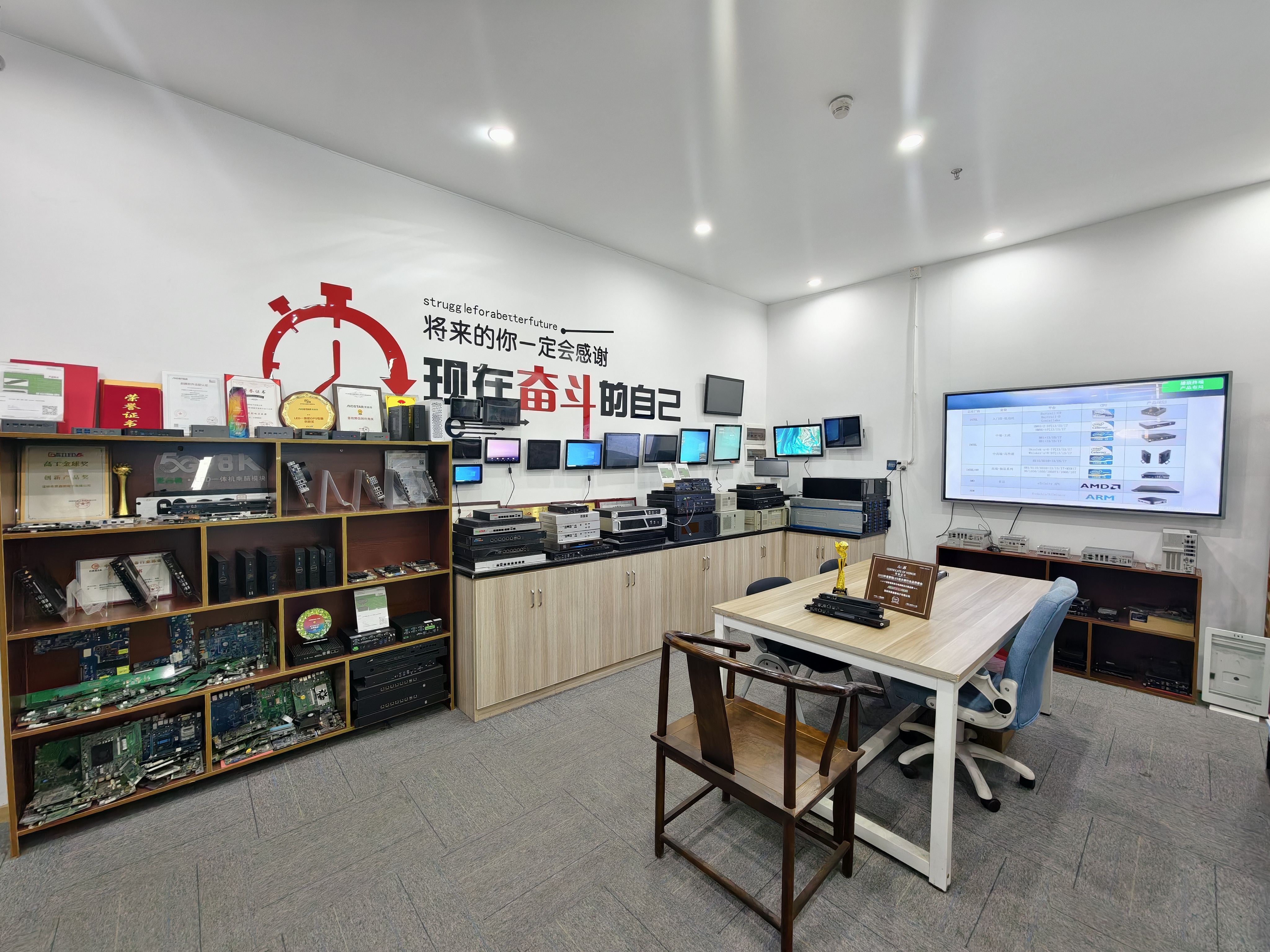
One slot standard, three very different workload profiles: the match is decided by the environment, not only by the specification sheet.
An OPS PC module is a removable computing unit that plugs into a standardized slot inside an interactive display, so the display's computing platform can be serviced or upgraded without replacing the panel. Intel's Open Pluggable Specification defines a unified 80-pin JAE connector and a module footprint of 180mm × 119mm × 30mm, which is why modules from different suppliers can, in principle, occupy the same bay. A regional variant, the OPS-C standard, is widely adopted in the Chinese domestic market for educational interactive whiteboards and typically uses different dimensions, around 180.8mm × 195.2mm × 42.5mm.
That standardization solved interchangeability at the connector. It did not solve fit at the workload. Two procurements can both specify "an OPS PC" and still need different processor classes, cooling designs, operating systems and service models — because a classroom whiteboard, a conference display and a commercial kiosk place different demands on the same slot. Matching OPS PC modules to use cases is therefore a decision taken at the evaluation stage and confirmed at the execution stage, not a catalogue lookup.
The commercial context explains why the distinction matters. The global Interactive Flat Panel market — the primary application for OPS modules — was valued at approximately USD 12.6 billion in 2024 (Grand View Research), and integrated OPS-slot compute modules and Android-based SoC modules are estimated to ship in 15–25% of new Interactive Flat-Panel Display units (IFPD Market Trends Report, 2023). Modular compute is no longer a niche configuration; it is a standard procurement path with scenario-specific requirements.
What the Standard Defines — and What the Buyer Still Decides
OPS defines the mechanical and electrical contract between display and compute module. It does not define the workload contract between module and environment.
Three decisions remain with the buyer, and each maps to a different risk category:
Interface fit. Module dimensions, connector type, pin definition, video interface, USB, power budget and display firmware must line up before production. This is where OPS and OPS-C incompatibility typically surfaces — the two variants are not mechanically interchangeable, and the constraint is set by the display, not by the module supplier.
Workload fit. Processor class, memory, storage and operating system have to match what will actually run on the panel: interactive teaching software, conferencing clients, continuous signage playlists, or local inference in a retail environment.
Lifecycle fit. Whether the compute unit can be serviced, upgraded or replaced independently from the display across a multi-year deployment, and how component changes are communicated and re-validated.
Three Deployment Profiles, Three Different Failure Modes
Environments do not fail in the same way. A classroom fleet most often fails as a software and image-consistency problem. A conference room most often fails as a peripheral or thermal problem. An unattended kiosk most often fails as a continuous-availability problem.
The compute module is only one variable in each case, but it is usually the variable the buyer controls directly. That is why scenario mapping should happen before a configuration is frozen — and why the same module family rarely serves all three environments without adjustment.
Classroom and Interactive Whiteboard Deployments: OPS-C and Touch-Intensive Use
In education, the dominant pattern is an OPS-C computer module paired with an interactive whiteboard or interactive flat panel. The OPS-C standard is a variant widely adopted in the Chinese domestic market for educational interactive whiteboards, and it is the form factor most classroom installations are designed around.
The workload is defined by touch. Teachers and students interact with the panel continuously through a lesson, so the module drives interactive software for extended sessions rather than short bursts. Two procurement consequences follow.
First, image consistency matters more than peak performance. Before imaging, the operating system version, BIOS functions, device drivers and application dependencies need to be confirmed, and functions such as Wake-on-LAN, auto power-on and watchdog should be validated on the final hardware configuration. A classroom fleet that boots inconsistently costs more to support than a fleet with a slightly slower processor.
Second, replacement economics favor modular design. Where a compute board is fixed inside a display enclosure, a compute failure can force replacement of the display assembly. A removable OPS module allows the computing unit to be serviced separately, which reduces complete-display replacement requirements by over 75% in typical compute-module failures and shortens on-site downtime.
Meeting Room and Conference Displays: Slot-in OPS for Video Conferencing
Conference displays run a different workload profile: video conferencing clients, USB cameras and speakerphones, and increasingly 4K display output. A slot-in OPS PC — typically an Intel-platform module — is the common configuration. Published product information for AIOSTAR's OPS range covers Intel 10th–13th Gen processors and Android platforms for digital signage and conference displays, alongside 4K OPS modules.
Installation is where the slot-in format shows its clearest advantage. Compared with an external desktop PC connected to an interactive display, a slot-in OPS module eliminates the standalone enclosure and external video and power wiring, reducing external cable quantity by over 70% and occupied installation space by more than 65% in a typical deployment.
The constraint buyers most often underestimate is thermal. Meeting rooms are enclosed spaces where acoustic noise is noticeable, which pushes designs toward quieter cooling — but sustained performance depends on processor power, enclosure airflow and the display's internal temperature. A configuration that performs well on a bench can throttle once the same module is sealed inside a display in a warm room. Selecting a cooling solution against the processor power profile and the display's internal temperature, then verifying with burn-in and thermal testing before mass production, is the practical control.
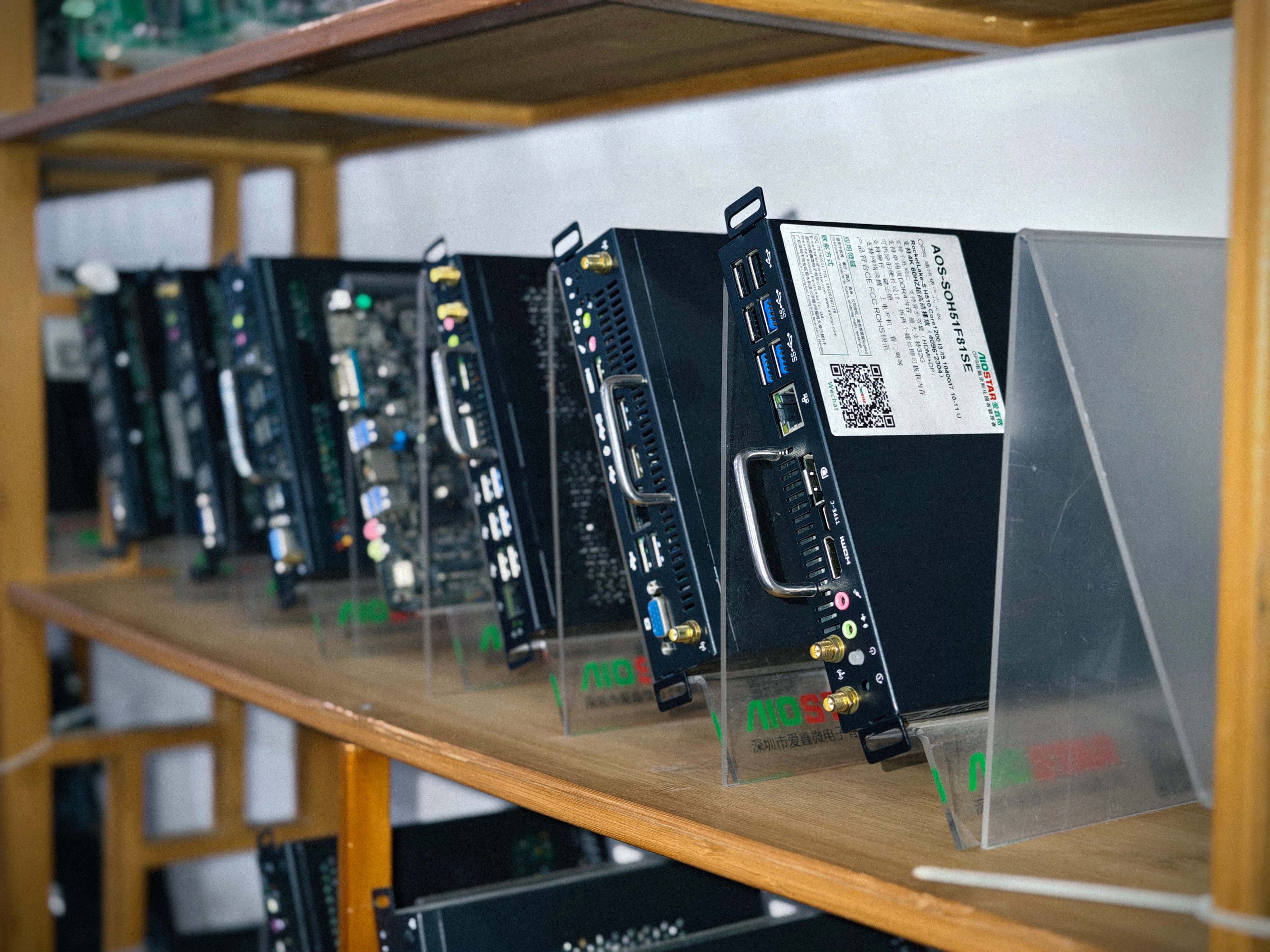
Pre-production samples are the point at which interface, image and thermal assumptions are tested on the customer's own display.
Commercial Kiosks and Continuous Playback: Android OPS Modules
Kiosks, retail signage and hospitality information displays are usually specified around an Android OPS PC module or an Android-based SoC module, because the content stack is network-managed and the unit is expected to run unattended for long periods.
Integrated installation changes the hardware count. Compared with an external Android media player, an Android OPS module integrates computing into the display's OPS slot and removes an external player chassis, a separate video cable, a USB touch cable and an independent power adapter — reducing peripheral hardware items by over 60% in a typical interactive-display installation. This profile suits retail signage, hospitality information displays, kiosks and networked media playback, and it reduces the number of separately powered devices that can fail in a public area.
Service access is the other consideration. A removable module can be taken out of the OPS slot for replacement or software service without moving the display, which matters when a unit is mounted in a high-traffic location where downtime is visible.
Android OPS Platforms and Edge-AI Retail Scenarios
A newer scenario is shifting the platform conversation. Retail and hospitality projects increasingly evaluate on-device processing so that content decisions, counting functions or interactive responses can be handled locally rather than round-tripping to a server, and Android OPS hardware is a natural host for that work because the application stack is already Android-based.
For an Android AI OPS configuration — an Android OPS module sized for on-device inference — the selection criteria change. Sustained compute, memory capacity and thermal headroom matter more than peak benchmark figures, because inference runs continuously rather than in short bursts. The OPS slot's power budget and the display's internal airflow remain the hard boundaries: an edge-AI workload that exceeds them will throttle regardless of the silicon selected.
For edge-AI retail specifically, the practical sequence is to define the workload first, then the sustained thermal envelope, then the module family and configuration — rather than choosing a module and assuming the display will absorb the heat. Buyers evaluating this scenario should treat display, module and workload as a single thermal system and validate them together.
Matching Matrix: Scenario, Module Family, Criteria and Risk
| Deployment scenario | Typical module family | Primary workload | Key selection criteria | Risk to control |
|---|---|---|---|---|
| Classroom / interactive whiteboard | OPS-C computer module | Touch-driven teaching software over long daily sessions | Bay dimensions, image consistency, remote boot functions | Operating system, BIOS or driver mismatch; overheating |
| Meeting room / conference display | Slot-in OPS PC module (Intel platform) | Video conferencing, USB cameras and speakerphones, 4K output | Processor class, USB power budget, quiet cooling | Thermal throttling inside an enclosed room |
| Retail kiosk / digital signage | Android OPS PC module | Continuous, network-managed playback | Unattended stability, remote service, auto power-on | Continuous-load overheating; unattended failure |
| Edge-AI retail | Android AI OPS configuration | Local inference plus interactive content | Sustained compute, memory capacity, thermal headroom | Sustained-load throttling; display power budget |
| Industrial-grade deployment | Industrial-grade OPS PC module | Extended operating cycles in less controlled environments | Cooling design, component lifecycle, change control | Component end-of-life; configuration change |
Validation Steps That Decide Whether the Match Holds
Once the scenario is mapped, execution-stage validation determines whether the match survives production. The controls below reflect documented risk-handling practice for OPS and OPS-C projects.
1. Mechanical and interface compatibility. Use a pre-production sample and a compatibility checklist. Verify module dimensions, connector type, pin definition, video interface, USB, power budget and display firmware, then test the module on the customer's own target display before confirming the final configuration.
2. Software and firmware validation. Confirm the required operating system version, BIOS functions, device drivers and application dependencies before imaging, then validate the approved image and required functions such as Wake-on-LAN, auto power-on and watchdog on the final hardware configuration.
3. Thermal validation. Select the cooling solution according to processor power, enclosure airflow and the display's internal temperature, and verify heat sink, fan and thermal contact design. Burn-in and thermal testing are conducted according to the project specification before mass production.
4. Logistics validation. Use protective internal packaging suitable for the module, accessories and the selected shipping method, and perform packaging checks with drop or vibration testing where the customer or project specification requires it.
5. Lifecycle control. Maintain a controlled bill of materials and evaluate form, fit and function alternatives when a component changes. Where a material change affects the agreed specification, notification and re-validation keep an installed fleet consistent.
How AIOSTAR Fits These Scenarios
AIOSTAR (Shenzhen Aiostar Electronics Co., Ltd.) is a Shenzhen-based computer hardware supplier founded in 2015 that develops, produces and supplies OPS PCs, OPS-C pluggable computer modules, Android OPS PCs, industrial motherboards, mini PCs, BOX PCs, industrial panel PCs, servers and customized embedded computing systems. Its products are used in interactive displays, digital signage, education, corporate meetings, industrial automation, smart transportation, retail and security projects.
For buyers matching modules to scenarios, the relevant operational facts are configuration control and production scale rather than a long model list. The company operates a 1,500 m² facility with 50 employees and an R&D team of 8 engineers, produces about 170,000+ units per year, and exports account for 60% of total sales across global markets.
OEM and ODM services cover hardware configuration, I/O, chassis, cooling, BIOS, operating system image, logo, packaging and accessories — the parameters that determine whether one supplier relationship can serve a classroom fleet, a conference room standard and a kiosk deployment at the same time. In practice, that is the point where scenario matching becomes a supply-chain question rather than a product question.
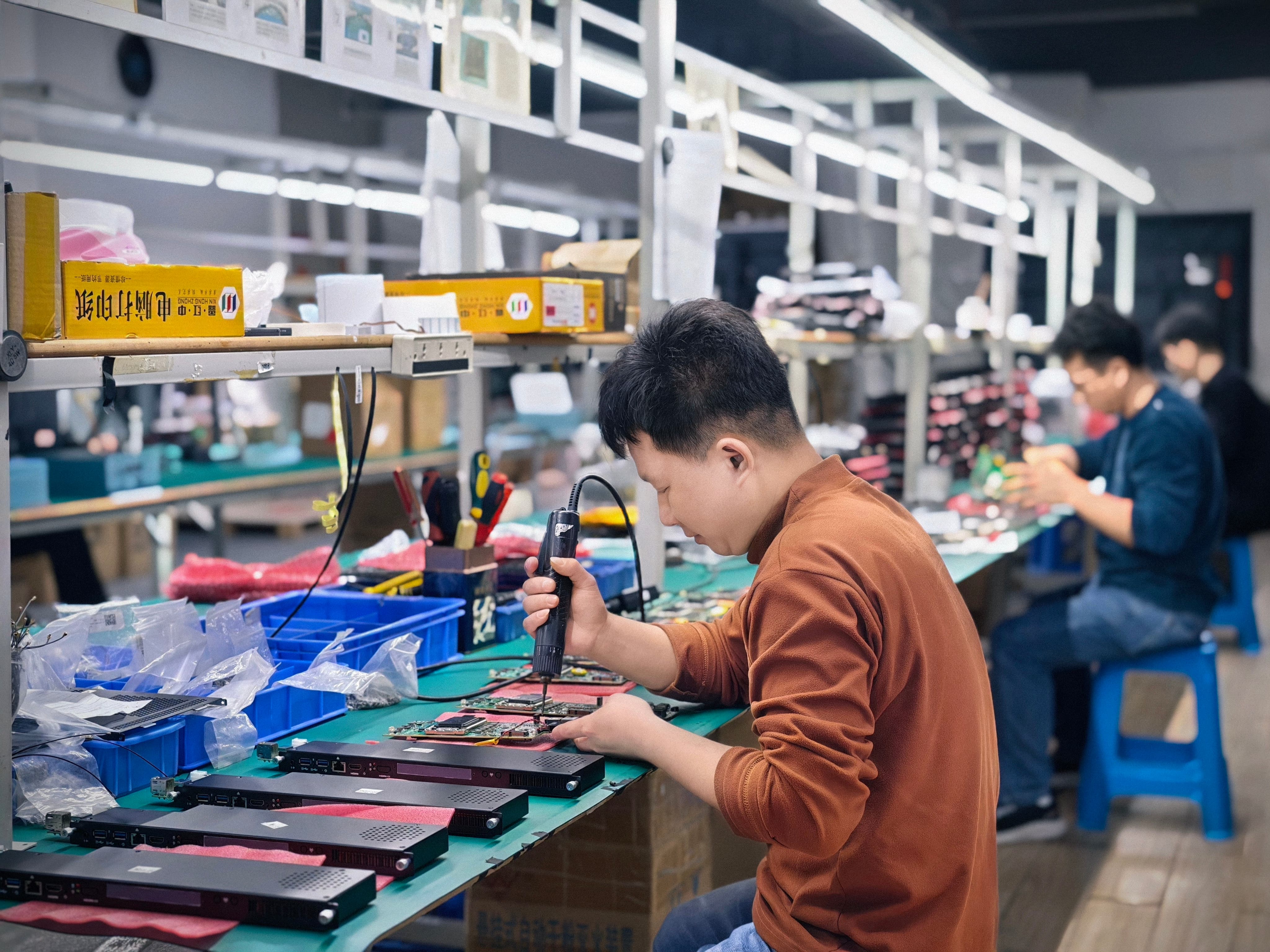
Multi-scenario programs depend on configuration and change control rather than on a single fixed hardware specification.
Where Slot-in OPS Modules Reach Their Limits
Modularity is not universally the right answer, and buyers should recognize the boundaries before standardizing on it.
The module cannot fix the display. OPS performance is bounded by the display's internal thermal and power budget. A high-power processor class selected without matching enclosure airflow and internal temperature will throttle, and no module specification can compensate for a display that was not designed to dissipate that heat.
Form factors are not interchangeable. Intel OPS and OPS-C differ in dimensions and serve different regional display ecosystems. A module that fits one bay will not necessarily fit another.
Expansion is limited by definition. Workloads that require discrete graphics, additional storage bays or full-length expansion cards generally fall outside what a slot-in module is designed to support. For those, an external PC or a different embedded platform remains the appropriate choice.
Slot availability is a display-side decision. Not every interactive display ships with an OPS bay, and where it does not, the compute platform is effectively fixed when the display is purchased.
Market Signals Behind Modular Display Computing
Three data points frame the trend. The global Interactive Flat Panel market was valued at approximately USD 12.6 billion in 2024 (Grand View Research). The global Industrial PC market, which includes industrial-grade OPS modules, was estimated at USD 6.48 billion in 2024 and is projected to grow at a CAGR of 6.30% through 2032 (Grand View Research) — although estimates vary between research firms depending on whether embedded and standalone systems are counted together, with at least one alternative estimate placing the 2024 figure at USD 5.36 billion (Precedence Research). The global interactive whiteboard market is projected to reach USD 730 million by 2030, with OPS penetration described as a key growth driver for modular classrooms (AV Supplier Industry Guide).
The direction of travel is consistent even where the numbers diverge: displays are increasingly treated as long-life assets while compute is treated as a replaceable component. That shift rewards buyers who plan the module-to-scenario match at the start of a program instead of discovering it during roll-out.
Future Outlook
Three developments are likely to shape scenario matching over the next procurement cycles.
First, lifecycle separation becomes the default expectation. As buyers extend display refresh intervals, the compute module becomes the upgrade point, which increases the importance of interface stability and change notification.
Second, edge workloads move onto the display. Retail, hospitality and classroom scenarios that currently stream decisions from a server will increasingly test local processing, raising the thermal and memory requirements of the module without changing the slot.
Third, validation moves earlier. Because interface, image and thermal risks are cheaper to resolve on a pre-production sample than on a production batch, compatibility checklists and target-display testing are likely to be formalized as standard steps at the decision stage rather than treated as exceptions at the execution stage.
FAQ
What is the difference between an OPS PC module and an OPS-C computer module?
Intel's Open Pluggable Specification defines a unified 80-pin JAE connector and a module footprint of 180mm × 119mm × 30mm. The OPS-C standard is a variant widely adopted in the Chinese domestic market for educational interactive whiteboards and typically uses different dimensions, around 180.8mm × 195.2mm × 42.5mm. The two are used in different display ecosystems, so the target display's bay should be confirmed before a module is specified.
Which module family fits classroom interactive whiteboards?
Classroom deployments are most often built around an OPS-C computer module. The workload is defined by touch interaction during lessons, so image consistency across many rooms matters. Before imaging, the operating system version, BIOS functions, device drivers and application dependencies should be confirmed, and functions such as Wake-on-LAN, auto power-on and watchdog validated on the final hardware.
What changes for meeting room conference displays?
Conference displays run video conferencing clients, USB cameras and speakerphones, and often 4K output, and are typically configured with a slot-in OPS PC module. Compared with an external desktop PC, the slot-in format reduces external cable quantity by over 70% and occupied installation space by more than 65%. The main constraint is thermal: cooling must be selected against processor power, enclosure airflow and the display's internal temperature, and verified with burn-in and thermal testing before mass production.
Can the same module family serve a classroom whiteboard and a retail kiosk?
Not automatically. Kiosks, retail signage and hospitality displays usually use an Android OPS PC module, because the content stack is network-managed and runs unattended; an integrated Android OPS module reduces peripheral hardware items by over 60% compared with an external Android media player. Classroom deployments typically use OPS-C. The limiting factors are mechanical fit to the display bay and the operating system and application stack the environment requires.
What validation should be completed before mass production?
A pre-production sample and a compatibility checklist should be used to verify module dimensions, connector type, pin definition, video interface, USB, power budget and display firmware, with the module tested on the customer's target display before the final configuration is confirmed. Software validation covers the approved image and functions such as Wake-on-LAN, auto power-on and watchdog. Burn-in and thermal testing follow the project specification, and packaging checks with drop or vibration testing are arranged where required.
What are the standard purchasing terms for evaluation and volume orders?
The minimum order quantity is 1 unit for evaluation samples, while volume MOQ depends on model and configuration. Delivery terms are EXW Shenzhen, FOB Shenzhen, CIF or DAP by agreement. Acceptance criteria cover functional and interface testing before shipment, with sample approval and third-party inspection available by agreement for project orders. Payment terms are 30% T/T deposit and 70% balance before shipment unless otherwise agreed in the proforma invoice.
How is component end-of-life handled in long-term display programs?
Risk handling relies on a controlled bill of materials and evaluation of form, fit and function alternatives when a component changes. Where a material change affects the agreed specification, the customer is notified, alternatives are validated, and approval is obtained when the project requires it. This is the mechanism that keeps a multi-year classroom, conference room or kiosk fleet consistent after the original configuration is no longer available.
For a consolidated overview of product families, configuration options and OEM/ODM scope, the AIOSTAR introduction brochure is available for download: Aiostar Introduction 2026_EN.
¿Tiene preguntas o necesita más detalles?
Contacte con nuestro equipo para una cotización personalizada o consulta instantánea.
Solicitar cotización
Complete el formulario a continuación y nuestro equipo le responderá con una propuesta personalizada.
Chat directo de WhatsApp
¿Prefiere chatear en tiempo real? Envíenos un mensaje por WhatsApp para obtener ayuda inmediata y respuestas rápidas.
- Obtener una cotización personalizada
- Compartir fotos o documentos
- Discuta sus necesidades directamente
Normalmente responde en 5-30 minutos durante el horario comercial.