
How to Choose an iPad Stylus Pen: A 2026 Sourcing Guide
Stylus pens have moved from an optional tablet accessory to a core input tool in education, mobile work and content creation. For an iPad user, an active stylus pen supports note-taking, drawing and navigation with much higher precision than a finger. For importers, distributors and brands, the category is now central to tablet accessory programmes.
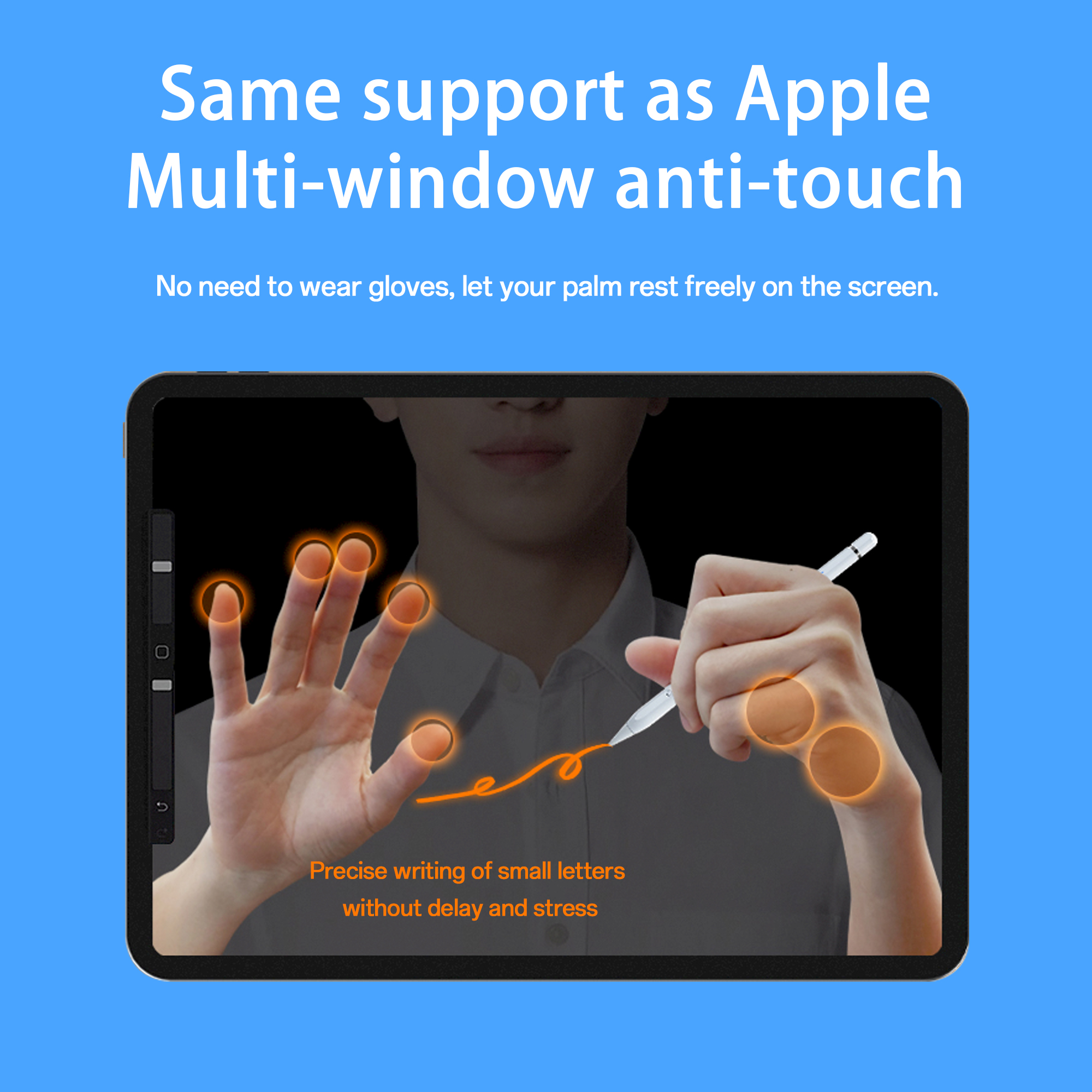
A stylus pen in active use on an iPad screen, representing the main note-taking and drawing use case.
Why stylus pens are moving from accessory to daily tool
Tablets are no longer consumed mainly as media devices. In education, design review, logistics, retail and remote work, people use tablets to write, annotate and draw. An active stylus pen improves that experience by making input feel closer to pen and paper. The buying decision is no longer only about price. Buyers now need to understand compatibility, charging, palm rejection, tilt sensing, tip replacement and supplier production capability.
The market context supports this shift. Multiple research groups track the category separately, and definitions vary: one broad stylus pen estimate values the global market at USD 19.45 billion in 2025, while other studies use a narrower digital pen definition and report a lower total. Despite the difference in scope, active stylus technology is projected to grow at a CAGR of 9.8% from 2026 to 2034. The direction is consistent: buyers are moving toward powered, precision stylus pens rather than simple finger replacement tools.
Problem and opportunity: terminology is easy to confuse
The most common problem in this category is not a shortage of products. It is the gap between marketing language and real technical behaviour. Terms such as active stylus, passive stylus, palm rejection, capacitive stylus, tilt-sensitive stylus, low-latency stylus and universal stylus are often used loosely. A buyer who does not distinguish active from passive may select a pen that cannot support the expected writing experience.
The opportunity is clearer now than in earlier tablet accessory cycles. As active stylus demand grows, brands and distributors can benefit from suppliers that openly explain how their pens work, what they can and cannot do, and where their limitations lie. This is especially true for procurement teams entering the market for the first time and for education projects that need consistent quality across larger volumes.
Active stylus vs passive stylus: the first decision
The first functional decision is active versus passive. A passive stylus, often called a capacitive stylus, is battery-free and works on the same principle as a finger touching the screen. It is inexpensive and simple, but it generally does not support palm rejection, tilt sensing or pressure control, and users may notice latency or offset while writing.
An active stylus pen contains a battery and transmits weak electrical signals to the touchscreen. The tablet detects these signals and calculates the tip position, which enables more precise writing and drawing. Active models typically support features that matter in real workflows: palm rejection, tilt sensing, magnetic attachment and replaceable nibs. In short, if a user only wants to replace a finger for navigation, a passive stylus may be enough. If the user needs note-taking, sketching, annotation or prolonged writing, an active stylus is the more realistic choice.
How an active stylus pen works with a tablet
An active stylus pen is powered by its battery. It transmits weak electrical signals to the touchscreen, and the tablet detects those signals to locate the tip position. The result is more accurate writing, drawing and tapping than a passive tip can provide. Product specifications in this category often describe predictable behaviour with phrases such as no offset and no delay, meaning the pen is designed to trace strokes continuously without visible drift or lag.
Compatibility is usually defined by the tablet and operating system version. Many iPad-oriented Jiayao active stylus models are specified for iPad models released after 2018 and for iPadOS 12.2 and above. Because each model generation can use a different protocol, the safest procurement rule is to match the stylus model to the exact tablet generation and OS version before ordering.
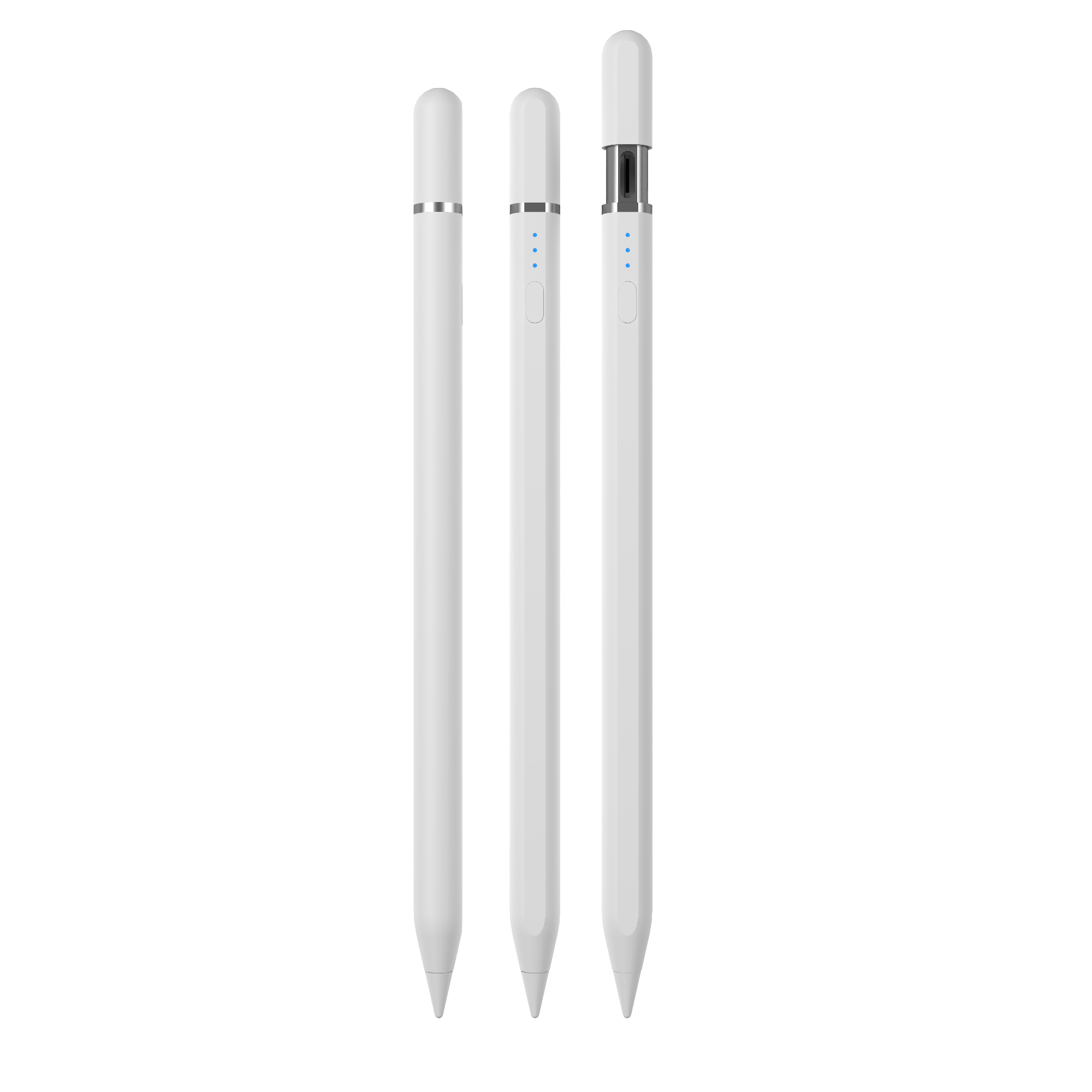
Jiayao W13-A stylus pen: an iPad active stylus with both wireless magnetic charging and a hidden Type-C charging option.
What a specialized stylus manufacturer brings to the supply chain
Dongguan Jiayao Intelligent Technology Co., Ltd, also known as Jiayao Stylus, is an active stylus pen manufacturer based in Dongguan, Guangdong, China. The company was founded in 2021 and operates a 2,700 sqm factory with about 100 employees. Its stated annual output is 3,000,000 units, with around 40% exported, mainly to the EU and USA. Jiayao supports OEM and ODM projects and covers the full internal process from PCBA design and battery welding to final assembly and quality testing.
For many stylus buyers, supplier flexibility matters as much as the product itself. Jiayao states that it can offer samples in as little as three weeks, deliver standard orders in about 20 days, and keep quantities of regular models in stock to handle small, scattered and urgent orders. Every stylus is described as going through 100% full inspection, including functional, tactile and visual checks. Customisation options such as logo, packaging function and Bluetooth name can be applied based on samples.
The portfolio is product-level, and the differences between models are important for buyers. The table below compares the main Jiayao stylus pen models across compatibility, charging, runtime and key design positioning.
| Model | Positioning | Charging | Working time | Notes |
|---|---|---|---|---|
| W13-A | iPad active stylus | Cable charging 15 min; magnetic wireless charging 60 min | 9-10 h | Side adsorption for 11 and 12.9-inch iPad; replaceable nib |
| W12-A | iPad active stylus | Type-C 25 min; magnetic wireless charging 60 min | 9-10 h | Side adsorption; top key switch |
| W3-H | iPad wireless-charge stylus | Magnetic wireless charging 70 min | 11 h | Side adsorption; top key switch |
| A30-B | iPad stylus with shortcut button | Type-C 25 min | 11 h | Aluminum alloy body; palm rejection; tilt sensing |
| A8-RH | iPad tilt-sensitive stylus | Type-C 30 min | 12 h | Palm rejection; tilt sensing; aluminum alloy body |
| A7-H-L | Long-running iPad stylus | Type-C 30 min | 16 h | Palm rejection; tilt sensing; aluminum alloy body |
| E3-A | Extended-runtime iPad stylus | Type-C 40 min | 44 h | Side adsorption; longer battery design |
| R3-P | Universal stylus for iPad and Android tablets | Type-C 40 min | 9-10 h | Side adsorption; replaceable nib; top switch |
| S3-GC | Android-focused universal stylus | Type-C 55 min | 10 h | Aluminum alloy body; top touch switch |
In addition, the A21B is presented as a 2-in-1 iPad stylus design. It combines active-oriented precision for iPad with a universal passive fiber tip, which gives users more flexibility when switching between devices or touchscreens.
Power management and charging behaviour
Battery behaviour is one of the most practical differences between stylus models. Most Jiayao active stylus models switch off automatically after about 10 minutes of inactivity, while some models extend this to 60 minutes. Standby time is stated as one year at full power for several models. For users, this matters because a stylus left in a bag or drawer should still be ready weeks later. For education projects, automatic power-off also reduces the risk of returning to a drained battery at the start of class.
Charging method influences procurement decisions as well. Some distributors prefer magnetic wireless charging because there is no port to expose. Others prefer a USB-C port because it is more universal and easier for end users to understand. Models such as the W13-A and W12-A attempt to solve this by supporting both magnetic wireless charging and cable charging. Buyers should map charging preference to the specific deployment environment rather than assuming one charging method fits all use cases.
Application and use cases in practice
One typical matching scenario is an education project using iPads or Android tablets. In that environment, a stylus needs to support precise note-taking, drawing and navigation on a touchscreen. Students and teachers may write notes, annotate documents, draw diagrams or interact with learning apps. The stylus must feel immediate, and it should not force the user to hold the palm above the screen while writing.
Jiayao’s application data describes this type of workflow clearly: the stylus is powered by its battery and transmits weak electrical signals to the touchscreen so the tablet can detect the tip position and record accurate strokes. The required support features include low latency, precise writing, side magnetic attachment and a replaceable pen tip.
In an education project, replaceable tips are particularly important because stylus nibs wear through normal use. A pen with a worn tip may still function, but writing feel and precision can decline. Magnetic side attachment also reduces the risk of losing the pen when it is not being used. These may sound like secondary details, but they influence total cost of ownership over a full school year.
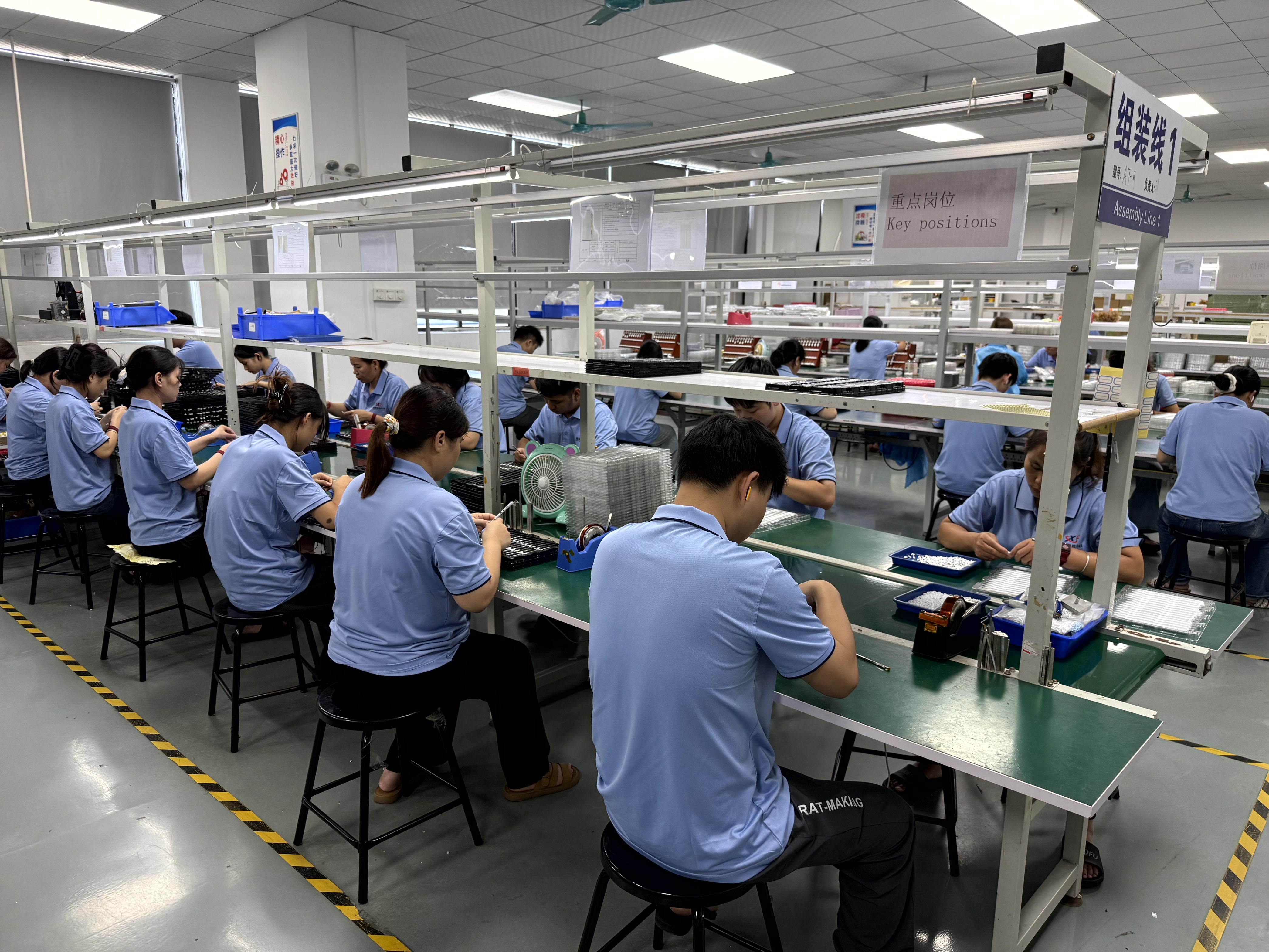
Production workshop at Dongguan Jiayao Intelligent Technology Co., Ltd, where stylus assembly and quality checks are handled in-house.
Market trend analysis: standards, ecosystems and buyer expectations
The stylus market is not a single technology ecosystem. On one side, proprietary systems such as Apple Pencil and Samsung S Pen serve users who want deep integration and high-end features. On the other side, open standards such as USI 2.0, released in 2022 by the Universal Stylus Initiative and supported by Google, Intel and Lenovo, are intended to create cross-platform consistency for active stylus pens. Apple’s iPad remains a separate ecosystem, which is why iPad stylus suppliers usually define compatibility by iPad model and iPadOS version rather than by a universal standard.
Feature expectations are also rising. High-end professional active pens such as the Samsung S Pen can offer up to 4,096 levels of pressure sensitivity. This does not mean every third-party stylus must reach that level, but it raises the benchmark that buyers use when comparing options. Third-party iPad stylus producers often compete on everyday performance features such as palm rejection, tilt sensing, magnetic attachment and faster charging rather than on full pressure sensitivity.
Importers should also understand the trade classification context. Stylus pens used as automatic data processing input units are typically classified under HS Code 8471.60.90. Correct classification matters for customs documentation, tariffs and market intelligence, especially for companies building a new import programme.
Comparison with traditional and first-party solutions
Compared with a passive stylus, an active stylus is more capable but adds a power requirement. Passive pens are simple, low-cost and battery-free, but they lack palm rejection and often feel inaccurate for handwriting. Active pens solve those issues but must be charged and managed like other electronics. For a school lab or a mobile workforce, charging discipline becomes part of the operational workflow.
Compared with the Apple Pencil, third-party iPad stylus pens occupy a different position. Jiayao’s own comparison material is transparent about the main difference: its iPad stylus models do not offer pressure sensing; they use tilt sensing instead. The company says its pens share precise writing, palm rejection and pause-doodle functionality with the Apple Pencil in everyday use, but pressure-sensitive drawing is the point where the two approaches separate. For professional artists who need pressure-controlled brush strokes, an official Apple Pencil is generally the safer recommendation. For note-taking, annotation, classroom use and general drawing, a third-party active stylus can cover most of the required workflow at a different price position.
This boundary is important for distributors. If a buyer sells stylus pens into a general consumer or education channel, tilt sensing and palm rejection may be enough. If the buyer targets creative professionals, the product story must be honest about the absence of pressure sensitivity. Overselling the feature set creates customer dissatisfaction and returns later.
Limitations buyers should keep in mind
The first limitation is active power dependency. An active stylus cannot function unless its battery has power. Even with one-year standby claims and automatic power-off, users must understand that the pen is not a passive rod; it is a small electronic device with a charging cycle.
The second limitation is the pressure-sensing gap for iPad-compatible third-party pens. As Jiayao states, its stylus pens do not replicate Apple Pencil pressure sensing. This matters for applications such as professional illustration, graphic design and signature capture where pressure information is part of the expected output. Third-party active stylus pens should be evaluated against the real applications of the end customer, not against the highest possible Apple feature set.
The third limitation is compatibility fragmentation. A stylus that works with an iPad after 2018 and iPadOS 12.2 or higher may not be appropriate for every tablet brand or every operating system. Open standards such as USI are not interchangeable with the Apple Pencil protocol. Procurement teams should match each product model to the actual target device and avoid assuming that one active stylus design can cover the entire tablet market.
A fourth practical limit is physical attachment. Some side adsorption features work only with specific iPad sizes. For example, the W13-A and A21B models state side adsorption support for 11-inch and 12.9-inch iPad models. Smaller iPads may behave differently, so product documentation must be checked at the model level.
Future outlook for stylus pen sourcing
Active stylus technology is expected to grow faster than the broader stylus category between 2026 and 2034. This will likely lead to more segmentation between basic battery-free pens, iPad-compatible active stylus pens, universal Android pens and open-standard USI pens. Buyers should expect more attention to low latency, palm rejection, tilt sensitivity, replaceable tips and charging convenience.
The role of the factory will become more important as brands search for differentiation. A manufacturer that controls PCBA design, battery assembly and final quality testing can make customisation decisions earlier in the product process. For a private-label brand or an education distributor, this means changes to logo, packaging, Bluetooth name or charging configuration can be handled as an OEM or ODM project rather than as a simple finished-goods purchase.
Given the supply chain complexity, buyers benefit from working with a limited set of technical specifications: target tablet model, iPadOS version, required active functions, charging method, expected continuous working time, nib replacement strategy and order volume. With these criteria clear, active stylus selection becomes less about broad claims and more about matching a real pen to a real workflow.
Frequently asked questions
What should I buy: passive stylus or active stylus?
An active stylus supports precise writing, palm rejection and tilt or pressure sensing, which makes it suitable for note-taking, drawing and sketching on tablets. It can also be used for games and general touch interaction, and the experience is usually much better than with a passive stylus. A passive stylus does not support palm rejection or tilt sensing and may have latency and offset when writing. If the task is only to replace a finger, a passive stylus is enough. If the user needs notes, annotations or drawings, an active stylus is the more appropriate choice.
What is the difference between a third-party stylus and an Apple Pencil?
According to Jiayao’s public comparison, third-party iPad stylus pens can provide precise writing, palm rejection and tilt sensing, but they do not provide the pressure sensing of the Apple Pencil. For users who need pressure-sensitive drawing, the official Apple Pencil is usually the safer option. For users who mainly need note-taking, annotation and everyday drawing, a third-party active stylus is positioned as a practical alternative, and the difference in price is often an important factor.
Which stylus model should a buyer choose?
Model choice depends on charging preference and usage time. Jiayao points to the W12-A when a buyer wants wireless charging plus a USB-C fallback. The A7-H-L is presented as the fast-charge-focused option, while the E3-A is positioned for extended runtime. The table in this article provides the charging time and working time for each model, allowing a buyer to match the pen to the intended deployment.
Reference document: Jiayao Intelligent Stylus Pen Catalogue (PDF)
¿Tiene preguntas o necesita más detalles?
Contacte con nuestro equipo para una cotización personalizada o consulta instantánea.
Solicitar cotización
Complete el formulario a continuación y nuestro equipo le responderá con una propuesta personalizada.
Chat directo de WhatsApp
¿Prefiere chatear en tiempo real? Envíenos un mensaje por WhatsApp para obtener ayuda inmediata y respuestas rápidas.
- Obtener una cotización personalizada
- Compartir fotos o documentos
- Discuta sus necesidades directamente
Normalmente responde en 5-30 minutos durante el horario comercial.