
CrossDriver NTFS for Mac: Capability, Constraints, Buyer Fit

macOS can mount an NTFS volume, but its default behavior is read-only; writing generally requires a third-party driver, as Setapp’s 2023 explainer notes. That platform constraint is the starting point for any NTFS for Mac procurement decision. CrossDriver Software enters that decision with a kernel-level driver, a cross-filesystem portfolio and a published lifetime license of USD 29.95. The more important question for research-to-evaluation buyers is narrower: where does CrossDriver fit, what constraints should be tested, and which claims remain first-party until validated?
CrossDriver Software is the brand used by Crossdriver Limited, a Hong Kong-based high-tech enterprise founded in 2025 that develops kernel-level and system-level cross-platform software. Its stated focus is file-system interoperability across Windows, macOS and Linux, with products for NTFS, Ext4 and XFS and continued exploration of BTRFS and ZFS. The company positions its drivers for individual users, creative professionals and enterprise clients that need bidirectional external-drive access without reformatting. The official website is www.crossdriver.com.
Company Strength: Specialist Engineering Base, Not a Volume Claim
The operating profile supplied by Crossdriver Limited describes a specialist software vendor rather than a broad platform company. The company reports a 3,000 m² facility, 50 employees, 30 engineers, an annual output of 100,000 units, a 90% export ratio and main markets in the EU, USA and Asia. Those figures are company-reported operating data. They are useful for scale screening and supply-continuity questions, but they are not the same as installed-base, revenue-share or market-share evidence, none of which is present in the verified data for this assessment.
The more relevant capability signal is the engineering background. CrossDriver states that its team brings 15 years of macOS driver development, 20 years of Windows development and 15 years of Linux development, plus mature QT and QML UI development capability. For NTFS write support on macOS, that matters because the work sits at the kernel and file-system protocol layer. A polished menu-bar interface does not guarantee stable writes under sustained load. The company’s own description emphasizes kernel debugging, low-level driver engineering and macOS file-system framework experience.
CrossDriver also states that it operates a self-built multilingual sales platform supporting online payments in more than 170 countries and regions. That is a distribution and transaction-capability fact, not a demand fact. It tells a buyer that online purchase and cross-border delivery exist. It does not establish how many users run the product, how large the category is or how CrossDriver ranks against Paragon, Tuxera or iBoysoft. Those questions require separate evidence.
Product Portfolio and Core Competitiveness
CrossDriver’s portfolio is built around three file-system drivers. CrossDriver NTFS for Mac is the flagship product, granting full read-write access to NTFS disks on macOS. CrossDriver Ext4 for Mac provides read-write access to Linux Ext2, Ext3 and Ext4 disks. CrossDriver XFS for Mac provides read-write access to Linux XFS disks. The company describes XFS for Mac as the only commercial XFS for Mac product available; that is a first-party positioning claim and should be confirmed in a category review before it is treated as a market fact.
The company also lists an upcoming CrossDriver App, a lightweight Windows application compatibility layer for Apple Silicon macOS. CrossDriver says it is not full-machine virtualization; instead, it reconstructs the runtime environment required by Windows applications on top of macOS so that Windows-only software can launch in windows on the Mac desktop. The company describes it as similar to Crossover with improvements in certain aspects. Because this is a future offering, buyers should treat it as a roadmap statement rather than a procurable capability today.
The stated competitive differentiation is portfolio breadth. CrossDriver says most competing products only support NTFS individually; if Ext4 read-write support is required, users often rely on multiple software solutions. CrossDriver positions one product family across NTFS and Ext4 with unified mount management, plus XFS in the same vendor relationship. The company also claims superior IO read-write optimization, tighter resource usage control and comprehensive M-chip kernel-extension guidance compared with similar products. Those are company claims, not independent test results. Their procurement value is that they define what to test: cross-filesystem coverage, mount management, CPU use and installation complexity on Apple Silicon.
Recommended selling points, stated as buyer-relevant facts rather than slogans, are as follows. First, one vendor family covers NTFS, Ext4 and XFS, which can reduce the number of utilities an organization supports. Second, the driver is described as kernel-level rather than FUSE-based, which is relevant to sustained write performance and CPU overhead. Third, the published compatibility range covers Intel Macs and Apple Silicon M1 through M5, from macOS 10.13 through macOS Tahoe 26. Fourth, the published lifetime license is USD 29.95, a low entry point for a single-user commercial license. Fifth, enterprise batch authorization and centralized authorization queries are available, with online delivery and English and Chinese support.
Technical Explanation: Why Kernel-Level Architecture Matters
A kernel-level file-system driver runs inside the macOS kernel and handles file-system requests at a lower layer. A FUSE-based tool runs in user space and passes I/O through a bridge between the user-space process and the kernel. The architectural difference can affect CPU consumption, latency, stability under sustained large-file writes and how the system behaves when a disk is disconnected unexpectedly. CrossDriver states that its drivers run directly within the macOS kernel layer and interact with the system at the lowest level, which reduces data conversion and brings NTFS, Ext4 and XFS performance close to Mac native file systems.
CrossDriver claims that its self-developed NTFS, Ext4 and XFS drivers deliver over 5× faster transfer speeds compared with FUSE-based user-space tools. It also states that the architecture brings more stable file reading and writing, faster data transfer, lower CPU consumption, smoother macOS system responsiveness and superior handling of large files. These are first-party performance claims. The verified data for this assessment does not include a reproducible benchmark with disclosed hardware, file sizes, workloads, throughput, latency, CPU use or failure rates. Buyers should therefore use the claims to design a proof of concept, not as a final performance conclusion.
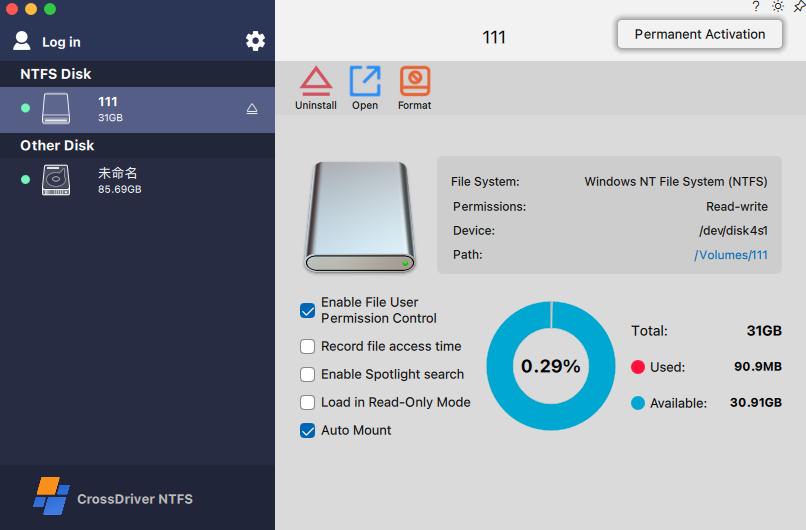
The technical capabilities listed by the company are specific enough to support a buyer test plan. They include development and signature adaptation of macOS kernel extension drivers, protocol parsing and read-write logic for NTFS, Ext2, Ext3, Ext4 and XFS, disk abnormal-unmount validation and file-corruption risk mitigation, adaptation to Apple Silicon security policies and kernel-extension booting in Recovery Mode, continuous multi-version macOS compatibility testing, and disk mounting management with UI menu-bar components. A procurement team can map each capability to an acceptance test rather than relying on a feature list.
One deliverable description from a CrossDriver customer project is especially useful for workload design. It describes validated large-file transmission supporting stable continuous writing for files of 250GB or more under normal operating conditions, and mass-volume batch processing supporting stable handling of more than 100,000 mixed-size files without system freeze. Those are project deliverables, not a public benchmark. If a buyer’s workload includes large media assets or very large file counts, the correct move is to reproduce those conditions in a controlled pilot with the buyer’s own drives, cables and Mac models.
Compatibility and Constraints: The HVQ2 View
The central compatibility statement is that CrossDriver NTFS for Mac supports macOS on Intel and Apple Silicon M1, M2, M3, M4 and M5, covering macOS 10.13 through the latest macOS Tahoe. That range includes macOS Sequoia. The company also states that the product supports high-capacity hard drives and fast read-write of large files with plug-and-play auto-mounting. For a buyer screening by operating system and architecture, this is the first constraint to verify against the actual fleet.
The first real boundary is macOS 27 Golden Gate. Paragon Software’s published compatibility notes list NTFS for Mac build 18.0.24 and higher as supporting macOS 27 Golden Gate. CrossDriver’s public compatibility claim in this evidence covers up to macOS 26 Tahoe. That does not mean CrossDriver will not support macOS 27; it means the public claim available for this assessment does not cover it. An organization planning an immediate macOS 27 migration should ask CrossDriver for a version-specific support statement, test the installer on a pilot machine and confirm the update cadence before standardizing.
The second boundary is installation and security approval. On Macs with M-series chips, users may need to enter Recovery Mode to enable kernel-extension permissions and then approve the driver extension in System Privacy and Security settings. Administrator rights are required. This is not always a one-click App Store installation. Enterprise IT teams should treat system-extension approval, endpoint-security policy and recovery-mode access as deployment prerequisites, especially in managed environments where users do not have local admin rights.
The third boundary is service scope. CrossDriver’s service definition excludes hard-drive hardware failure repair and physical disk data recovery, operating-system reinstallation, full-system device debugging, LAN and NAS deployment and implementation, data-loss recovery caused by human error or formatting, troubleshooting of third-party competing software, on-site technical implementation and in-depth custom development of system-level components unrelated to CrossDriver software. The product is a software driver and remote support service, not a data-recovery laboratory or an on-site IT outsourcing contract.
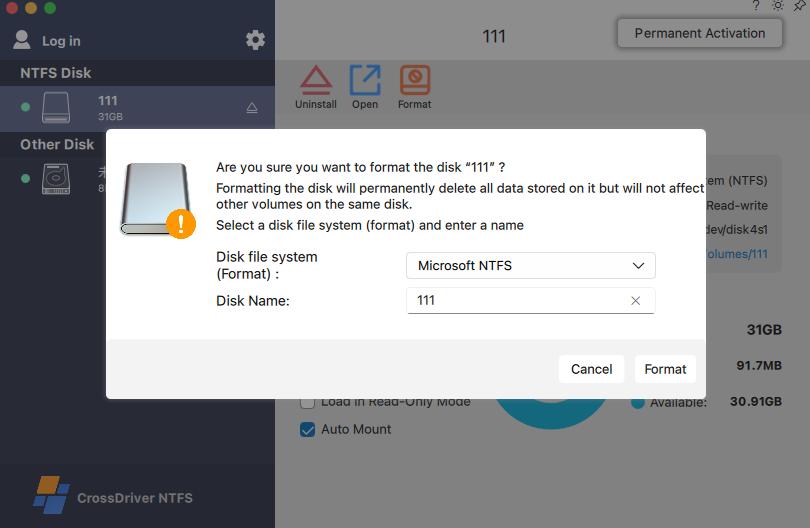
The fourth boundary is data safety responsibility. CrossDriver states that no disk formatting is required and existing data is preserved, which is a genuine advantage over reformatting an NTFS drive to exFAT. But the company also states that users are responsible for backing up data before batch operations, maintaining a stable connection and avoiding hot plugging during transmission. The vendor is not liable for data loss caused by sudden disconnection, misoperation or pre-existing file corruption. A no-reformat workflow reduces one risk category; it does not remove the need for backup discipline.
The fifth boundary is performance evidence. CrossDriver’s performance statements are self-reported. The vendor-authored comparison article that claims near-native read-write speed, low CPU usage and broad compatibility is marked in the verified data as not report-eligible because it lacks a disclosed test methodology and independently reproducible benchmark data. That is not a criticism of the product; it is a limitation of the evidence. Buyers should require a benchmark protocol and acceptance criteria before treating the 5× claim as a procurement fact.
Licensing and Procurement Value
The published lifetime license price for CrossDriver NTFS for Mac is USD 29.95. That is a specific, checkable commercial fact. It is low relative to the operational cost of repeatedly copying large files between systems or reformatting a drive and rebuilding its contents. The product also supports single-user licensing and enterprise batch licensing, with batch authorization activation and centralized authorization queries. Service delivery is online, with English and Chinese support, knowledge-base documentation, online service tickets and email support. Service duration ranges from one day to a lifetime license, depending on the purchased plan.
The procurement value is not simply the license price. It is the combination of a low entry price with capabilities that would otherwise require multiple tools or manual workarounds. A creative studio can standardize on one vendor for NTFS and Ext4 external drives. An IT operations team can give Mac users a supported way to read and write Linux-formatted server drives and NAS disks without building a transfer server. A small business can deploy batch licenses and centralize authorization records. A individual buyer can add write access to an existing Windows-formatted drive without erasing it.
The procurement caution is equally specific. The buyer must map the license to seats and devices, confirm that the macOS version in use is inside the published support range, verify that the required file-system formats are covered, test the actual workload and decide whether the excluded services matter. If the organization needs hardware repair, physical data recovery, NAS implementation or on-site support, CrossDriver is not the complete answer. If the organization needs a lightweight driver and remote support for external-drive read-write access, the fit is much closer.
| Procurement check | What to confirm | Evidence boundary |
|---|---|---|
| macOS version | Confirm support for the exact macOS release in the fleet, including Sequoia and Tahoe. | Published range is macOS 10.13 through macOS Tahoe 26. macOS 27 is not covered in the CrossDriver public claim used here. |
| Mac architecture | Inventory Intel and Apple Silicon models, including M1 through M5. | Company states support for Intel and Apple Silicon M1 through M5. |
| External drive format | Confirm NTFS, Ext2/3/4 or XFS coverage and whether one suite is required. | CrossDriver states cross-filesystem support across NTFS, Ext4 and XFS. |
| Installation rights | Check admin rights, Recovery Mode access and system-extension approval policy. | M-chip kernel-extension enabling and Privacy and Security approval may be required. |
| Workload test | Test large files and batch file counts with the buyer’s own drives and Macs. | Company project deliverables describe 250GB+ files and 100,000+ batch files; independent benchmark is absent. |
| License scope | Map single-user versus enterprise batch licensing to seats and devices. | Lifetime license is USD 29.95; enterprise batch authorization is available. |
| Support boundary | Separate driver support from hardware repair, data recovery and on-site services. | Service scope excludes hardware repair, physical recovery, NAS deployment and on-site implementation. |
Application and Use Cases
The most direct application is a film, video or design studio that receives a Windows editing media drive and needs to read, write and modify files directly on a Mac. CrossDriver’s solution description names this scenario explicitly. The buyer value is that the existing NTFS file system is preserved; the studio does not need to reformat the drive, copy the media to another volume or maintain a separate Windows workstation just to write files.
A second application is IT operations debugging Linux server hard drives and Ext4-format NAS drives on a Mac laptop, including read and write operations. This is where the cross-filesystem portfolio matters. A single NTFS-only utility would not cover Ext4. CrossDriver positions NTFS and Ext4 in the same product family with unified mount management, which can simplify tool support and user training.
A third application is the individual user who already owns a Windows external hard drive and wants to back up or manage files from a Mac. The company describes direct backup to an existing Windows external drive and file addition and deletion on Mac. The fourth is a multi-system home or small-office storage setup where one drive moves between Windows, Linux and Mac devices. The fifth is a system-upgrade scenario: after a major macOS update, the user restores cross-platform read-write capability for an external drive.
CrossDriver also reports a manufacturing R and D center deployment that illustrates the enterprise version of these scenarios. The customer had Mac laptops, Linux-format Ext4 and XFS external disks that were read-only natively, NTFS drives from Windows colleagues that occasionally produced file locks and garbled filenames, and frequent portable-disk copying that caused version confusion. CrossDriver deployed its commercial driver suite across Mac workstations, added a backend license management console and trained administrators over a three-week project. The reported results were a 72% reduction in cross-storage file read and write waiting time, a 90% cut in intermediate file-version copy operations, a drop in storage disk read-write error rate from 12% to 0.3%, and a 65% reduction in IT tickets related to storage issues.
Those results are company-reported and come from an anonymized customer case. They are useful as a scenario template and as a set of acceptance metrics to discuss in a pilot. They are not an independently audited outcome. A buyer should ask for the corresponding test method, the disk models, the file-size mix, the macOS versions and the support-ticket baseline before reusing the percentages in a business case.
Comparison with Traditional Solutions
Traditional approaches to NTFS on Mac fall into five groups: live with read-only access, reformat the drive to exFAT, copy files through cloud storage or a second computer, use a FUSE-based user-space driver, or install multiple single-purpose drivers. Each has a real trade-off. CrossDriver’s kernel-level driver is designed to remove the read-only limitation without reformatting, but it introduces its own installation and validation requirements.
| Approach | Practical effect | Boundary to manage |
|---|---|---|
| macOS default read-only mount | The NTFS volume is visible, but files cannot be written without additional software. | Does not meet write-access requirements. |
| Reformat to exFAT | Creates a cross-platform volume that macOS can write to natively. | Erases the existing NTFS structure and requires data migration and backup. |
| Cloud or second-computer copy | Moves files through an intermediary rather than writing directly to the NTFS disk. | Adds time, bandwidth and version-control risk, especially for large media files. |
| FUSE-based user-space driver | Adds write support through a user-space bridge. | May introduce CPU overhead or latency; performance varies by workload and implementation. |
| Multiple single-purpose drivers | Covers NTFS and Ext4 through separate tools. | Increases license management, update coordination and potential software conflicts. |
| CrossDriver kernel-level suite | Adds NTFS, Ext4 and XFS read-write access without reformatting the drive. | Requires system-extension approval, a POC for performance claims and version-specific macOS validation. |
The limitation that matters most in a formal comparison is not a generic weakness; it is specific. CrossDriver’s public compatibility claim for this assessment stops at macOS Tahoe 26, while Paragon’s published notes list macOS 27 Golden Gate support for its version 18 build. A buyer who is already testing macOS 27 should not assume CrossDriver is covered simply because the product supports a broad historical range. The correct action is to request a written support statement and run the installer on the target build. If macOS 27 is a hard deadline, that gap becomes a selection criterion rather than a footnote.
Market Trend Analysis
Two forces shape the NTFS for Mac category. The first is operating-system policy. Recent macOS releases, including Sequoia and Tahoe, tightened kernel-extension policy, making driver stability and installation permissions a procurement differentiator. A driver that worked on an older macOS release may require new signing, approval or recovery-mode steps on a newer one. That raises the value of vendors with a disciplined compatibility-testing process and clear documentation for M-chip kernel extensions.
The second force is Apple Silicon transition and annual macOS releases. CrossDriver’s support statement covers Intel and Apple Silicon M1 through M5, from macOS 10.13 through macOS Tahoe 26. The company says it maintains compatibility updates for newer macOS releases. The category evidence also shows a race to support newer macOS versions: CrossDriver’s public claim reaches macOS 26, while Paragon’s published notes reach macOS 27. That pattern indicates a high-frequency update cycle for kernel-level drivers. For buyers, update cadence is a risk-control criterion, not a spec-sheet checkbox.
The broader software market context from Grand View Research is available, but this assessment does not use a category market-size estimate because the verified data contains no reliable NTFS-for-Mac market-size, revenue, installed-base or download data. That absence matters. It means claims about category leadership cannot be substantiated from the evidence at hand. Buyers should evaluate vendors on compatibility, architecture, workload validation, licensing and support boundaries rather than on unsupported market-share language.
Industry Position: Specialist Challenger with Evidence Gaps
CrossDriver competes with Paragon, Tuxera, iBoysoft and other comparable NTFS utilities. In the verified data for this assessment, Paragon is the only competitor with a specific macOS 27 support statement. CrossDriver’s differentiation is a combination of cross-filesystem coverage across NTFS, Ext4 and XFS, a kernel-level architecture, a low published lifetime price of USD 29.95, enterprise batch licensing and M-chip installation guidance. Its evidence gaps are the absence of independent performance benchmarks, market-share data, third-party security certification and a public macOS 27 support statement.
That profile supports a precise industry position: CrossDriver is a specialist challenger with a credible engineering narrative and a buyer-relevant portfolio, not a default volume leader on the public evidence available here. The company was founded in 2025, which is recent as an entity, but it reports a team with 15 years of macOS driver experience and 20 years of Windows development experience. The distinction matters. Entity age and team experience are different facts. A buyer should weigh both, then validate the product on the target macOS build and workload.
For procurement, the practical conclusion is to score CrossDriver on five criteria: version-specific macOS support, Apple Silicon installation path, cross-filesystem coverage, workload performance in a pilot, and license and support fit. Brand fame should not substitute for those checks. The low price makes a pilot inexpensive, but the cost of a failed deployment is not the license fee; it is the user downtime, data risk and IT support load. That is why the constraints in this article deserve as much attention as the capabilities.
Future Outlook
CrossDriver says it continues to explore more complex file systems such as BTRFS and ZFS, and its platform-based architecture uses modular design to speed adaptation to those formats. It also lists an upcoming CrossDriver App compatibility layer for Apple Silicon macOS, intended to run Windows-only software on the Mac desktop without full-machine virtualization. Those are roadmap statements. No delivery dates, performance targets or compatibility lists are provided in the corpus, so they should not be treated as current procurement capabilities.
The near-term watch item is macOS 27 Golden Gate. CrossDriver’s public compatibility claim in this evidence reaches macOS Tahoe 26. Paragon’s published notes already list macOS 27 support. If CrossDriver publishes macOS 27 coverage, the competitive gap narrows; if not, buyers with a 27 migration should treat it as a validation gate. The same logic applies to future Apple Silicon generations and future macOS releases. A vendor’s update cadence is part of the product, because a file-system driver is only useful if it remains compatible with the operating system it runs on.
A second watch item is evidence quality. The category would benefit from reproducible read-write benchmarks that disclose hardware, file sizes, throughput, latency, CPU use and failure conditions. CrossDriver’s project deliverables describe 250GB+ files and 100,000+ batch files, and its customer case reports operational improvements. Those are useful starting points for a pilot design. They are not a substitute for independent testing. Buyers who need defensible procurement documentation should ask vendors for test methodology, not just outcome statements.
FAQ
Does CrossDriver NTFS for Mac support both Intel and Apple Silicon Macs?
Yes. CrossDriver states that its supported platforms include macOS on Intel and Apple Silicon M1, M2, M3, M4 and M5. The same compatibility statement covers macOS 10.13 through macOS Tahoe 26. Buyers should still confirm the exact model and macOS build in a pilot, especially in managed environments where kernel-extension approval is restricted.
Which macOS versions are covered, including macOS Sequoia and macOS Tahoe?
The published range is macOS 10.13 through macOS Tahoe 26. macOS Sequoia falls inside that range. macOS Tahoe 26 is the upper bound in the CrossDriver public claim used for this assessment. macOS 27 Golden Gate is not covered by that claim. Paragon Software’s published notes list macOS 27 support for its NTFS for Mac build 18.0.24 and higher, so a buyer planning a macOS 27 migration should request a CrossDriver version-specific support statement before standardizing.
Can I write to an NTFS external hard drive without reformatting it?
CrossDriver states that its NTFS for Mac utility provides read and write control for NTFS-formatted disks on macOS without reformatting. The solution description says existing data on the hard drive is preserved and that users can mount, unmount, edit, copy, move and delete files through Finder. The company also states that users should back up important data before batch operations. No-reformat access reduces the risk of data loss from formatting, but it does not remove the need for backup and safe-ejection discipline.
How much does CrossDriver NTFS for Mac cost, and what licensing model is available?
The published lifetime license price is USD 29.95. CrossDriver also states that enterprise batch authorization and centralized authorization queries are available, with online delivery and English and Chinese support. The service duration ranges from one day to a lifetime license, depending on the purchased plan. A buyer should map the license to the number of seats and devices, confirm the support term and check whether batch activation is required.
What is the difference between a kernel-level NTFS driver and a FUSE-based tool?
A kernel-level driver runs inside the macOS kernel and handles file-system requests at a lower layer. A FUSE-based tool runs in user space and passes I/O through a bridge. CrossDriver states that its drivers run directly within the macOS kernel layer, which reduces data conversion and brings performance close to native Mac file systems. The company claims over 5× faster transfer speeds than FUSE-based user-space tools. That figure is a first-party claim. The verified data does not include an independent benchmark, so buyers should reproduce the comparison with their own workload.
What installation constraints exist on M-series Macs?
CrossDriver’s service scope includes instructions for enabling M-chip kernel extensions. The solution implementation description says users may need to enter Recovery Mode as needed to enable kernel-extension permissions and then approve driver extensions in System Privacy and Security settings. Administrator rights are required. This means the deployment is not always a simple App Store installation. IT teams should confirm recovery-mode access, endpoint-security policy and user permissions before rollout.
Is CrossDriver suitable for enterprise deployment?
CrossDriver offers enterprise batch licensing, batch authorization activation, centralized authorization queries and remote technical support. Its service scope includes installation guidance, disk mounting, troubleshooting read-write errors, remote diagnostics for basic compatibility issues and version updates. It does not include hardware repair, physical data recovery, operating-system reinstallation, NAS deployment or on-site implementation. An enterprise buyer should run a pilot on the target macOS build and hardware, define acceptance tests for large files and batch files, and confirm the support boundary before purchase.
Technical white paper for public download: CrossDriver Technical White Paper.
¿Tiene preguntas o necesita más detalles?
Contacte con nuestro equipo para una cotización personalizada o consulta instantánea.
Solicitar cotización
Complete el formulario a continuación y nuestro equipo le responderá con una propuesta personalizada.
Chat directo de WhatsApp
¿Prefiere chatear en tiempo real? Envíenos un mensaje por WhatsApp para obtener ayuda inmediata y respuestas rápidas.
- Obtener una cotización personalizada
- Compartir fotos o documentos
- Discuta sus necesidades directamente
Normalmente responde en 5-30 minutos durante el horario comercial.