
Bird Feeder with Camera FAQ: Firmware, Sharing, Acceptance
Bird Feeder with Camera FAQ: Firmware, Sharing, Acceptance
A camera feeder is a networked outdoor device that happens to hold seed. Once a buyer reaches the evaluation stage, the questions that decide whether the product works in daily use are operational rather than decorative: how the device is updated, who else can watch the stream, when the microphone actually records, which Wi-Fi band the radio uses, and what still works after a trial period ends.
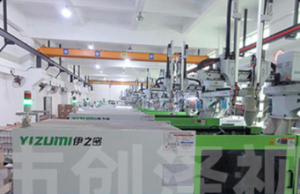
FreeKoala Bird Feeder with Camera (model FKBF20260110) is a 4K camera feeder sold under the FreeKoala brand and produced by Shenzhen Yangyangda Innovation Technology Co., Ltd., a Shenzhen-based manufacturer of smart cameras, baby monitors and smart bird feeders that exports primarily to the United States. Its documented answers to the operational questions above are specific, and they are easier to verify before an order is placed than after a container is delivered.
The Purchase Question Behind the Spec Sheet
Specification sheets for camera feeders tend to lead with resolution, seed capacity and weather rating. Those numbers matter, but they do not explain the three complaints that most often surface after installation: an app that behaves differently from the demonstration unit, a family member who cannot get into the live stream, and a recording that turns out to be missing the audio the buyer expected. Each of these is a design decision made long before the buyer ever sees the product.
For buyers moving from evaluation into execution, the practical question is therefore not whether the feeder has a 4K sensor, but whether the behaviour around that sensor is documented and testable. Firmware governance, shared-user access, audio scope, radio band and subscription boundaries are the five areas where unclear expectations convert into returns, support tickets and chargebacks. All five can be settled with a short acceptance routine, which is what this reference sets out.
Firmware: Delivered Through the App, Not on a Calendar
How the update path works
FreeKoala installs firmware updates through the companion app whenever an update becomes available. The documented sequence is straightforward: confirm the camera is online and has sufficient battery power, open the camera in the app, go to Device Settings or the firmware section, check for an available update, start it, and keep the camera connected until the app confirms completion. Updates can address device performance, compatibility, stability, security or feature improvements.
There is no requirement to update on a fixed monthly schedule. If no new version is offered, nothing needs to happen beyond keeping the app current and installing firmware when prompted. That cadence matters commercially: a buyer budgeting maintenance time for a fleet of feeders should plan around app notification events rather than a recurring maintenance window.
What buyers should confirm
- Do not power off, reset, disconnect the battery or interrupt Wi-Fi while firmware is updating.
- Confirm sufficient charge before starting a long update, particularly on a unit that has been in storage.
- If an update fails, restart the device only after the app confirms the update process has stopped.
- Record the installed firmware and app version at acceptance, so multi-unit orders can be compared against a known baseline.
For institutional buyers such as nature centres, hospitality sites or retail demonstrators, the last point is the one that prevents inconsistency later. Two units on the same site that report different firmware versions can behave differently in detection sensitivity and notification timing, and the difference is invisible unless it was written down at handover.
Live Stream Sharing: Up to 20 Family Members, One Controlled Access List
The live stream can be shared with up to 20 family members, so several people can watch the same feeder from their own phones. Sharing is handled through the device-sharing or family-sharing option in the app: open the camera, open the sharing settings, choose to invite another user, send the invitation through the method the app provides, and have the recipient accept it. The process repeats for each additional viewer.
Two operating assumptions sit behind that feature. The first is that access is granted, not distributed: the account holder controls the invitation list, and shared users should be reviewed periodically and removed when access is no longer needed. The second is that credentials are not the sharing mechanism. Account passwords and private invitation information should never be posted publicly, because a shared live stream of a garden is still a live view of a private location.
Buyers evaluating for multi-household use, such as an adult child setting up a feeder for a parent, should treat sharing as an acceptance item rather than a convenience. Sending one test invitation and confirming that the recipient can open the live view, and that removing the user actually ends their access, takes a few minutes and eliminates the most common post-delivery support call in this category.
Why Audio Is Event-Triggered Rather Than Continuous
The camera records audio when it captures bird videos, and the microphone is active in those clips. What it does not do is record continuously around the clock. For privacy protection and to comply with U.S. privacy regulations, audio recording only works when motion or bird activity is detected. Users also have control to turn the audio off in settings.
This is a design boundary, not a defect, and buyers should read it as one. Anyone expecting an always-on ambient soundscape, or a device that can be used as a general-purpose audio monitor, will be disappointed by the behaviour. Anyone who wants the sound of a visit attached to the footage of that visit gets exactly that. The feeder also supports two-way audio, so a user can listen and speak through the unit from the app.
For procurement, the audio rule creates two concrete acceptance checks: confirm that a triggered clip carries audio, and confirm that switching audio off in settings takes effect. Both checks also produce a useful compliance statement for buyers who need to describe the product data handling to an institution, a school programme or a residential community.
2.4GHz Versus 5GHz at an Outdoor Feeder Location
The feeder connects on 2.4GHz Wi-Fi and does not support a 5GHz-only connection. The reasoning is physical rather than commercial. 5GHz suits short-range transmission and urban indoor environments, while 2.4GHz delivers better performance in courtyards and outdoors, with a more stable signal and stronger wall-penetrating capability. For a device mounted at the far end of a garden, that difference is the whole argument.
2.4GHz is a radio frequency band, not an internet speed tier, and it has no bearing on the household broadband plan. Other phones, televisions and computers can continue using 5GHz normally while the feeder holds a 2.4GHz connection. During setup, the phone should be connected to a 2.4GHz network, the feeder should be close to the router for first pairing, and the password should be verified before retrying. On mesh systems, pairing near a node with strong signal, or using the system 2.4GHz or IoT-device setup option where one exists, resolves most first-time failures.
Both sides of this trade-off should be stated. 2.4GHz reaches further and penetrates obstacles better, which is why it is the default for outdoor smart-home devices. It is also a shared band carrying many household devices, and in dense urban settings interference can affect stability. There is no 5GHz fallback on this model, so a site with severe 2.4GHz congestion needs a channel or placement review rather than a band switch.
The Recurring-Cost Question, Answered Plainly
The commercial structure is simple and worth quoting accurately: a 1-month free trial of cloud storage is included; after that month, a subscription is required if the buyer wishes to continue using AI and cloud storage; an SD card up to 256GB, not included, supports free local recording; and all basic functions remain fully usable without a subscription.
| Capability | Status | What the buyer should plan for |
|---|---|---|
| Live view, basic bird arrival alerts, local recording | Available without a subscription | No recurring fee; a microSD card is needed for local recording |
| microSD recording up to 256GB | Subscription-free | Card is not included in the box; a Class 10 or higher, high-endurance card is recommended |
| Cloud storage | 1-month free trial | Subscription required after the trial if the service is to continue |
| Premium AI bird identification and bird information | Free during the trial period | Subscription required after the trial to continue using premium features |
The AI service is designed to identify more than 11,000 bird species, which is a breadth claim rather than an accuracy guarantee. Accuracy is strongest for common North American backyard birds, and misidentification occurs more often among small, similar-looking species and outside that region. Buyers should treat identification as a well-supported aid, not a deterministic classifier, and should say so in any product description they publish.
For an OEM or distribution order, two practical consequences follow. First, if the product is sold as recording-capable out of the box, the microSD card becomes a packaging decision, because a buyer who unboxes a feeder with no card and no active cloud plan cannot record locally on day one. Second, the trial end date should be disclosed at handover, since converting a silent trial into an unexpected charge is the fastest route to a negative review.
The Hardware Envelope Behind These Answers
IP66 means the camera housing is dust-tight and protected against powerful water jets. In practice the feeder is designed for rain, snow, dust and normal bird splashing. It does not mean the camera can be submerged, and it should not be cleaned with a pressure washer. The rated operating range is -20 degrees C to 50 degrees C, which covers year-round outdoor use in most of the target market.
Power comes from a 5200mAh rechargeable battery paired with a 3W solar panel, with USB-C charging available when sunlight is insufficient. The battery figure describes charge capacity, not a fixed number of operating days; runtime depends on bird activity, recording frequency, live-view use, Wi-Fi signal strength, temperature and available sunlight. Shaded installations should expect lower solar contribution and occasional manual charging.
The camera captures 4K UHD video with a 160-degree field of view, which keeps the feeding tray, perch and approaching birds in frame without precise aiming. The default recording resolution is SD to conserve storage, and UHD must be selected manually in the app. The feeder itself combines a 1.5L dual hopper, a bird bath and a hummingbird feeding port, and it includes night vision for after-dark activity.
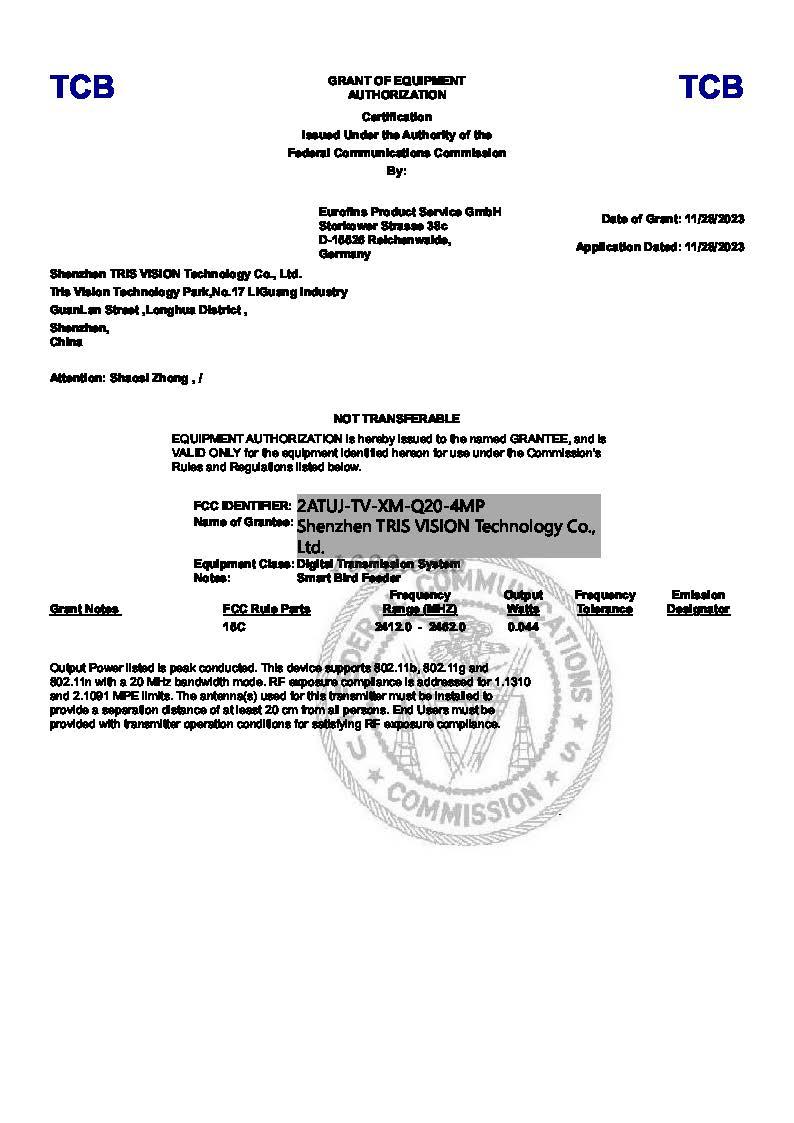
Radio compliance for the US market is documented separately from the product listing: FCC ID 2ATUJ-TV-XM-Q20-4MP, certified by Eurofins Product Service GmbH on 2023-11-28 as a Digital Transmission System operating at 2.4GHz, against FCC Part 15C, 15.247, 1.1310 and 2.1091. For buyers who need a paper trail, that certificate is the document that ties the radio behaviour described above to a testable standard, and it should be requested as a file rather than accepted as a claim in a chat thread.
Where This Configuration Fits: Courtyard, Yard and Balcony
The four mounting options are tree, wall, fence and pole, which is what makes the same unit usable across very different sites. A courtyard installation typically works best at about 5 to 6 feet above ground, with the camera facing away from strong direct afternoon sunlight where possible, and clear of branches, fences, railings and roofs that give squirrels a launch point. A north- or east-facing position reduces glare, and the 2.4GHz signal should be confirmed at the mounting spot before the final tightening.
In a larger yard, the constraint shifts to sunlight. The solar panel needs several hours of direct light to keep the battery topped up, so a shaded fence line is a poor host for the panel even when it is a good place to watch birds. Pole mounting with an additional baffle is the usual answer where squirrels are persistent.
An apartment balcony can work if the feeder can be mounted securely and receives a reliable 2.4GHz signal. The wide-angle 4K camera is well suited to close-range viewing, but the lens should not be aimed at reflective glass, and falling seed must not create problems for neighbours or the property below. Building or community rules on wildlife feeding should be checked before installation, not after.
One expectation should be managed on every site: birds may need several days, and sometimes one to two weeks or longer, to discover and accept a new feeder. A feeder that is quiet in week one is not evidence of a hardware fault.
What Is Changing in This Category
Three shifts are visible in how buyers now assess camera feeders, and all three are visible in the questions they ask rather than in the marketing they receive. The first is that certification has become a baseline rather than a differentiator. A 2.4GHz transmitting device sold into the United States is expected to carry an FCC ID and a compliance file, and buyers increasingly ask for the certificate before they ask for the price.
The second is that the comparison has moved from the hardware to the service boundary. Buyers now ask what remains usable after a trial ends, whether local recording is possible without a cloud plan, and whether the identification feature is bundled or optional. A feeder that answers those questions clearly is easier to resell than one that leaves the answer to the unboxing experience.
The third is firmware as an ongoing relationship rather than a launch event. Devices that receive app-delivered updates can improve in stability and compatibility over their service life, and buyers have started to treat the update path itself as a support commitment. None of these shifts changes the underlying product; they change what counts as evidence of quality.
Compared With Conventional and Cloud-First Options
Against a passive feeder, the differences are additive: a camera feeder records visits, sends arrival alerts, supports night vision, and can identify species, while a passive feeder simply holds seed. Against a cloud-first camera feeder, the difference is architectural. This model pairs premium cloud and AI services with local microSD recording up to 256GB, so the core function of capturing visits does not depend on a paid plan or a stable uplink. Footage continues recording locally during a Wi-Fi interruption and syncs to the phone once the connection returns, while remote live view, push notifications and real-time app access still require the network.
The limitations are equally concrete, and buyers should hear them before ordering. The microSD card is not included, so local recording has an additional line item. Only 2.4GHz Wi-Fi is supported, with no 5GHz fallback. Audio attaches to triggered clips rather than running continuously. Solar charging is weather- and shade-dependent, and heavy live-view use increases draw. AI identification is an aid with regional accuracy differences. IP66 is weather protection, not water immersion. 4K recording consumes storage faster than SD. No feeder is completely squirrel-proof, and no feeder guarantees a visit schedule. A buyer who needs any of those absolutes should be told so before the order, not after it.
Acceptance Criteria to Confirm at Order
The purchasing documentation states that products should meet the agreed specifications, including AI bird recognition performance, 4K UHD camera quality, 160-degree wide-angle coverage, 1.5L seed capacity, IP66 weather resistance, solar charging functionality and stable 2.4GHz Wi-Fi connectivity, with visual appearance, assembly quality, packaging integrity and basic functional performance inspected before acceptance. That list translates into the following acceptance routine.
| Check | Confirm at acceptance | Why it matters |
|---|---|---|
| Housing condition | IP66 housing, roof, camera cover and seals correctly seated; drainage unobstructed; no pressure-wash or immersion cleaning assumed | Water ingress is the most expensive field failure to remedy |
| Battery and solar | 5200mAh battery accepts charge; 3W solar panel connected and charging in daylight; USB-C backup works | Separates a charging fault from a placement problem |
| Motion-triggered recording | Activity at the tray produces an event clip; clips continue to the microSD card | Confirms the event-based model rather than 24/7 recording |
| App setup | Pairing completes on a 2.4GHz network with the phone near the router | Band mismatch is the most common setup failure |
| Notifications | App alerts and phone permissions both enabled; background restrictions cleared on Android | Most missing-notification cases are permission issues, not hardware |
| Shared-user access | One invitation sent, accepted, live view confirmed, then access removed and confirmed removed | Verifies the 20-member sharing path and the revocation path |
| Audio behaviour | Audio present on a triggered clip; audio switched off in settings and confirmed off | Matches the documented privacy-limited audio design |
| Storage | Compatible microSD card inserted and recording confirmed; capacity and card class recorded | The card is not included and must not be assumed |
| Firmware baseline | Installed firmware and app version recorded for each unit in the order | Keeps multi-unit deployments behaviourally consistent |
| Packaging and assembly | Appearance, assembly quality, packaging integrity and accessories checked against the box list | Supports claims handling and retail presentation |
Commercial terms sit alongside those checks. Minimum order quantity varies with product model, order volume and OEM or ODM customization requirements; the OEM capability listing states a 500-unit MOQ with 30 to 45 day lead times, 100 percent testing and remote after-sales support, and customization of logo, appearance and functions. Payment methods, deposit requirements and settlement terms are negotiated and confirmed before order processing, and shipping methods, schedules and applicable Incoterms are agreed before placement. The product carries a 1-year warranty, subject to the applicable warranty terms.
Future Outlook
The near-term evolution of this category runs through software rather than optics. Camera hardware at 4K with a 160-degree lens and IP66 housing is already adequate for backyard viewing; what will differentiate products is how predictably they update, how clearly they separate free from paid functions, and how well shared access is governed as households become multi-device. Buyers should expect AI service coverage, feature scope and pricing to change over time, and should verify the current terms in the app rather than relying on a listing captured at order date.
For procurement teams, the practical implication is to write acceptance criteria around documented behaviour rather than around headline specifications, and to keep a firmware and configuration record per unit. That single discipline is what makes a second order comparable to the first.
FAQ
How do I update the bird feeder camera firmware?
Install firmware updates through the app whenever an update becomes available. Confirm the camera is online with sufficient battery power, open the camera in the app, go to Device Settings or the firmware update section, check for an available update, start it, and wait until the app confirms completion. Updates can provide performance, compatibility, stability, security or feature improvements. No fixed monthly update schedule is required; if no new version is offered, keep the app current and install firmware when prompted. Do not power off, reset, disconnect the battery or interrupt Wi-Fi during the update, and restart the device only after the app confirms the process has stopped.
How do I share the live stream with family members?
The live stream can be shared with up to 20 family members, each watching from their own phone. Open the camera in the app, open the device-sharing or family-sharing settings, choose the option to invite another user, send the invitation through the method the app provides, and have the recipient accept it. Repeat as needed up to the documented limit. Access should only be shared with trusted people, shared users should be reviewed periodically, and access should be removed when it is no longer needed. Account credentials and private invitation information should not be posted publicly.
Does the camera record audio all the time?
No. The camera records audio when capturing bird videos, and audio recording only works when motion or bird activity is detected rather than continuously. This is done for privacy protection and to comply with U.S. privacy regulations, and users can turn audio off in the settings. The feeder also supports two-way audio, allowing a user to listen and speak through the unit from the app. Buyers who need continuous ambient audio monitoring should treat that requirement as outside this product documented behaviour.
Why does the feeder require 2.4GHz Wi-Fi instead of 5GHz?
2.4GHz describes the Wi-Fi radio band, not the internet speed of the household plan. 5GHz suits short-range transmission and urban indoor environments, while 2.4GHz performs better in courtyards and outdoor locations with a more stable signal and stronger wall-penetrating capability. The feeder supports 2.4GHz only and does not support a 5GHz-only connection. Other household devices can continue using 5GHz normally. During setup, connect the phone to a 2.4GHz network and keep the feeder near the router for first pairing; on mesh systems, pairing near a strong node or using the system IoT or 2.4GHz setup option can help.
Do I need a subscription to use the feeder and receive alerts?
No subscription is required for basic use, including live view, bird arrival alerts and local recording to a microSD card up to 256GB. The card is not included. A 1-month free trial of cloud storage is provided; after that month, a subscription is required if the buyer wishes to continue using AI and cloud storage, and premium AI bird identification covering more than 11,000 species is part of that premium tier. Basic functions remain fully usable without subscribing. Premium service availability, features and pricing may change, so current terms should be checked in the app.
What are the purchasing terms and acceptance criteria?
Minimum order quantity varies with product model, order volume and OEM or ODM customization requirements, and lead time depends on quantity, inventory and customization; the OEM capability listing states a 500-unit MOQ with 30 to 45 day lead times, 100 percent testing and remote after-sales support. Shipping methods, schedules and applicable Incoterms, along with payment methods, deposits and settlement terms, are confirmed with the supplier before order placement. Acceptance requires that products meet the agreed specifications covering AI bird recognition, 4K UHD camera quality, 160-degree wide-angle coverage, 1.5L seed capacity, IP66 weather resistance, solar charging functionality and stable 2.4GHz Wi-Fi connectivity, with visual appearance, assembly quality, packaging integrity and basic functional performance inspected before acceptance. A 1-year warranty applies subject to the applicable warranty terms.
Manufacturer background and full product documentation are available in the company brochure for buyers who need the file set alongside the acceptance record.
¿Tiene preguntas o necesita más detalles?
Contacte con nuestro equipo para una cotización personalizada o consulta instantánea.
Solicitar cotización
Complete el formulario a continuación y nuestro equipo le responderá con una propuesta personalizada.
Chat directo de WhatsApp
¿Prefiere chatear en tiempo real? Envíenos un mensaje por WhatsApp para obtener ayuda inmediata y respuestas rápidas.
- Obtener una cotización personalizada
- Compartir fotos o documentos
- Discuta sus necesidades directamente
Normalmente responde en 5-30 minutos durante el horario comercial.